How We Built a Website Assistant on Vapr and Deployed It on Condense

|
Condense Apps
AI Agent


TL;DR
We built an AI assistant that lives on zeliot.in and handles everything for a first-time visitor or an active user might need. Ask about Condense or Vapr, book a meeting, read a blog, download an eBook, or sign up to try Condense. It queries Zeliot's website and documentation in real time, maintains conversation context across turns, and can take actions directly inside the chat. Orchestration runs on Vapr, and the entire stack is deployed on Condense on Zeliot's own cloud. This post walks through the architecture and the decisions that shaped it.
Why We Built This
People land on zeliot.in at very different stages. Some are evaluating Condense for the first time and want to understand how BYOC works. Some are engineers looking for a specific integration in the docs. Some are ready to sign up and just need the right link. Some have a question at 11 PM when no one is online.
For all of these, the standard website experience like navigation menus, a search bar, and a contact form, creates friction. Users have to figure out where to look, open multiple pages, and leave the site to book a meeting or find an eBook. A lot of intent gets lost in that process.
The assistant we built collapses that entirely. A user can type "how does BYOC work", "show me blogs on Kafka pricing", "I want to try Condense", or "book a demo", and get a direct, useful response without leaving the chat window.
What the Assistant Can Do
Before getting into how it's built, here's what it actually handles:
Product questions
Anything about Condense, Vapr, pricing, deployment models, connectors, certifications, or comparisons with other platforms. It pulls from zeliot.in and docs.zeliot.in in real time.
Blog discovery
A user can ask "show me articles on Kafka migration" or "what have you written about BYOC" and the assistant surfaces relevant posts directly.
eBook and resource lookup
Similar to blogs, but for downloadable guides and whitepapers from the resources section.
Meeting booking
The assistant checks availability and creates an appointment directly through Microsoft Graph APIs without redirecting the user to an external page.
Condense sign-up
Users who want to try the platform can be guided through the sign-up flow from the same conversation.
Each of these is implemented as a discrete tool that Vapr invokes based on what the user is asking. The distinction between "answering a question" and "completing an action" is important, both happen inside the same chat, and the user doesn't have to context-switch between them.
Architecture Overview
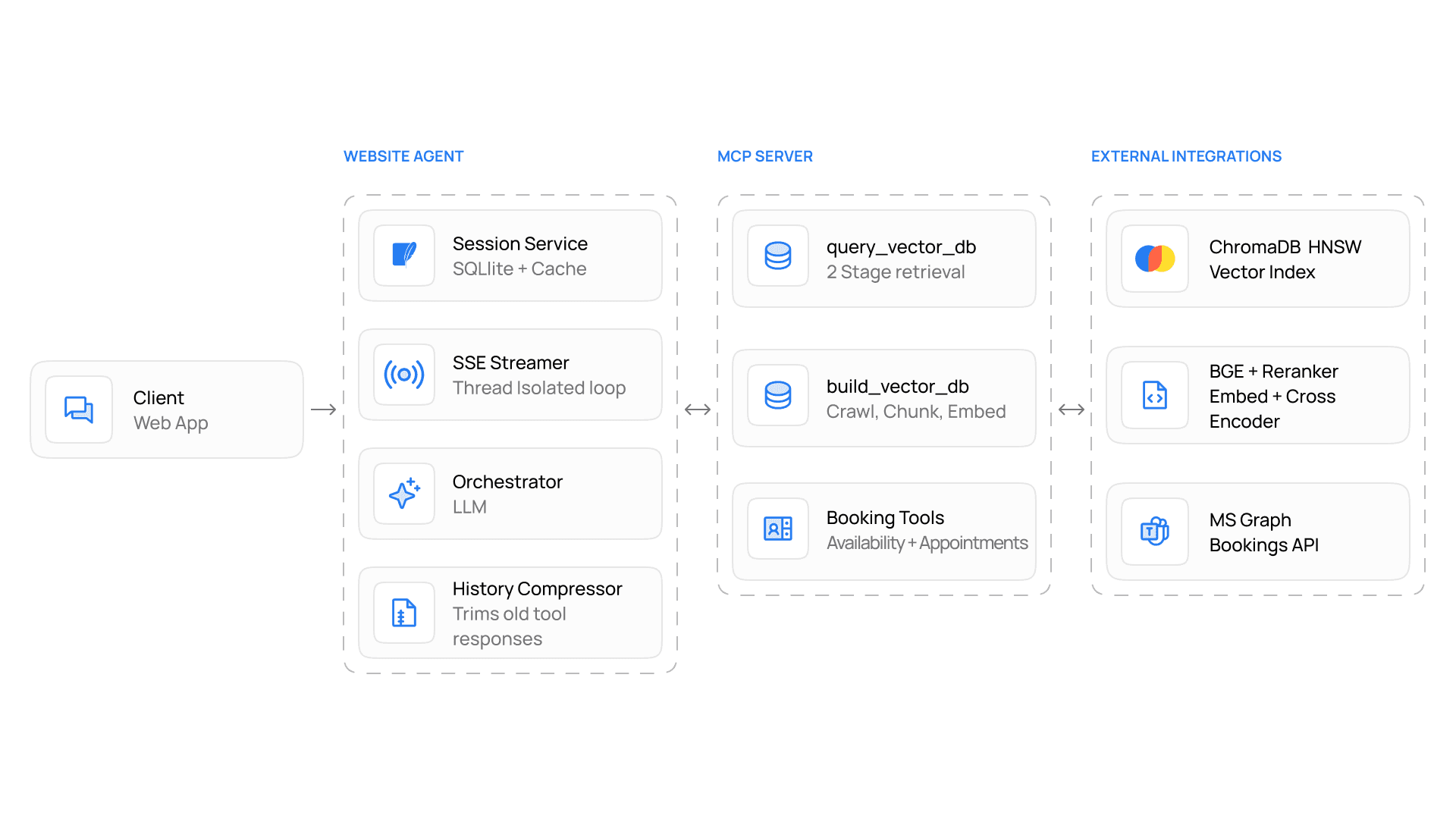
The system has three layers:
Orchestration
Orchestration is handled by Vapr, Zeliot's autonomous AI agent. Vapr determines what the user is asking, which tools to invoke, and how to combine retrieved information into a coherent response.
Tool Layer
A set of purpose-built tools Vapr can call: documentation and website search, blog retrieval, eBook lookup, availability checking, appointment creation, and sign-up flow initiation.
Knowledge Sources
zeliot.in, docs.zeliot.in, and structured data for blogs, eBooks, and resources. These are indexed and queried in real time.
Keeping orchestration, tool execution, and knowledge sources as separate components means each can be updated independently. Adding a new tool, say, surfacing podcast episodes doesn't require touching the retrieval pipeline or the session layer.
Building the Knowledge Layer
The assistant needs to answer questions about Condense and Vapr accurately. That means pulling from real content: product pages, documentation, comparison pages, customer stories, rather than from a model's training data, which goes stale.
Crawling and Extraction
The ingestion pipeline crawls zeliot.in and docs.zeliot.in recursively from configured base URLs. At each page, it strips navigation, sidebars, footers, and framework-generated elements before passing content downstream. Raw HTML is noisy: navigation menus, repeated CTAs, and GitBook artifacts all add content that hurts retrieval quality. Cleaning this before indexing made a visible difference in early testing.
Chunking
Content is split into semantically meaningful chunks rather than at arbitrary character limits. Arbitrary splits produce chunks that are syntactically complete but miss the point of what a section is about. Chunk size and overlap are configurable, which matters because documentation pages and blog posts have different structural patterns.
Embeddings
Chunks are embedded using Nomic's embedding model, strong retrieval performance, long-context support, and fast enough to embed zeliot.in's full content without heavy infrastructure. The pipeline uses asymmetric retrieval patterns, embedding documents and queries differently for better search accuracy.
Storage
Embedded chunks are stored in ChromaDB with an HNSW index. Each entry includes the chunk content, metadata, and source URL, which lets the assistant return source links with answers rather than generating responses without attribution.
Two-Stage Retrieval
When a user asks a question, a single vector search isn't sufficient for a production assistant. Too much noise gets through.
User Query > Embedding Search > Top Candidate Documents
The retrieval pipeline runs in two stages. The first stage does a fast semantic similarity search against ChromaDB to get a candidate set, the goal is recall, not precision. The second stage passes those candidates through a Cross Encoder reranker, which evaluates each query-document pair together instead of comparing vectors. This removes the noise, and the result is more precise, more relevant context is what gets passed to Vapr for response generation.
Candidate Documents > Cross Encoder > Ranked Results
The difference in answer quality between vector-only retrieval and the two-stage approach was significant enough that we wouldn't have shipped without the reranker.
Conversational Memory
The assistant maintains context across turns so a conversation feels continuous rather than a series of isolated Q&As. A user who starts by asking about Kafka connectors, then asks "which of these work with MQTT?", then says "can I book a call to discuss?", that whole thread stays coherent.
Session state is stored in SQLite: session identifiers, chat history, and cached responses. For long conversations, a compression mechanism periodically summarizes older turns while preserving the context that matters. Without this, long sessions become slow and expensive quickly.
Streaming Responses
The assistant streams responses back using Server-Sent Events rather than waiting for a complete answer before showing anything. Users see output almost immediately, which matters more than it might seem a three-second wait for the first token feels significantly slower than a three-second wait before a complete response appears all at once, even if the total time is the same.
User Request > Orchestrator > Token Stream > SSE Channel > Browser
Streaming uses dedicated thread-isolated event loops to prevent blocking other application threads under concurrent load.
Meeting Booking and Actions
The scheduling flow is worth describing in detail because it's one of the more useful things the assistant does.
When a user says something like "I'd like to book a demo" or "can I speak to someone about pricing", Vapr invokes the availability tool, which queries Microsoft Graph APIs to find open slots. The user picks a time, the appointment is created, and a confirmation comes back, all within the chat. The user never leaves zeliot.in to use an external booking tool.
The same pattern applies to Condense sign-ups. Rather than sending the user to a separate flow, the assistant can guide them through it from the conversation. Actions happen where the intent is expressed, not somewhere else.
Deploying on Condense
The full stack runs on Condense, on Zeliot's own cloud. Condense handles containerization, scaling, environment variable management, and monitoring without requiring separate infrastructure decisions for each.
The deployment follows the Condense Applications workflow:
Step 1
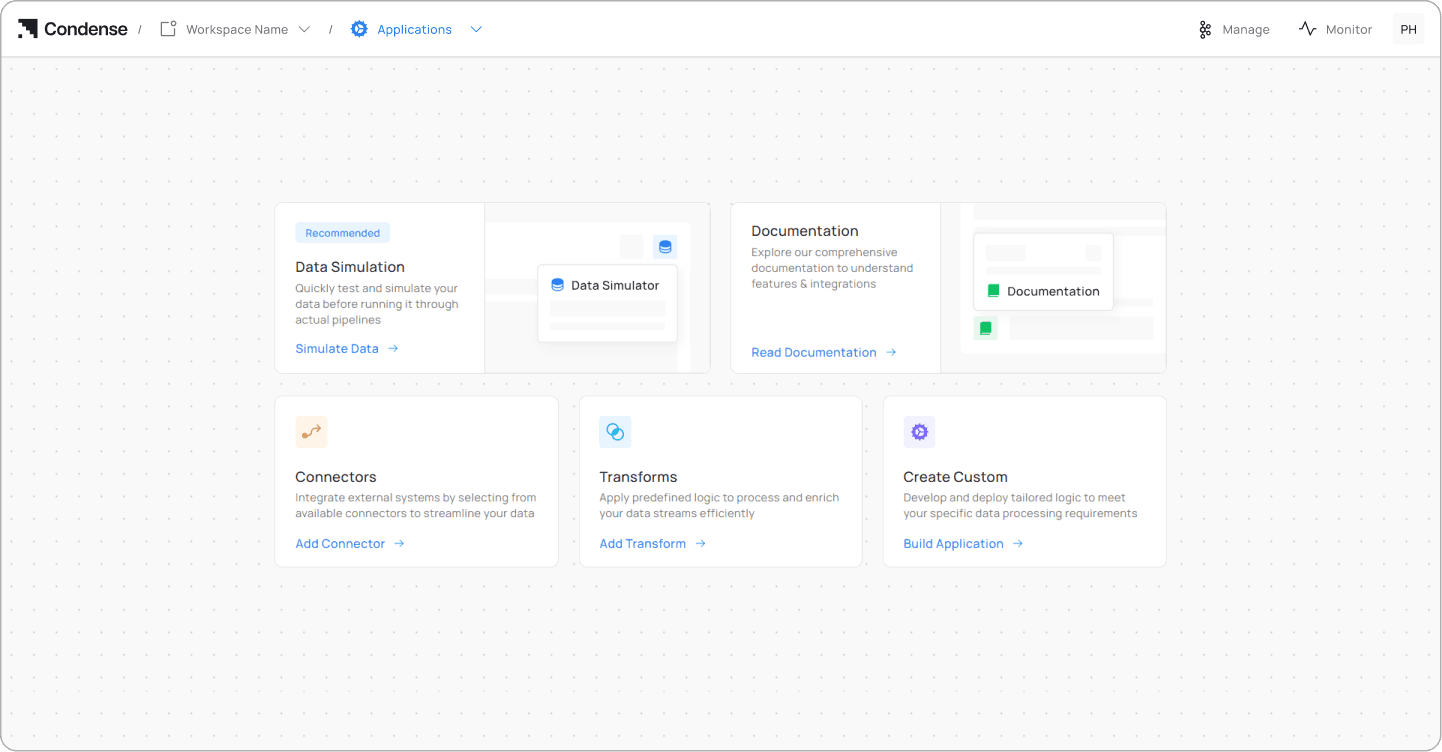
Create a workspace inside Condense and click Create Custom to start a new application.
Step 2
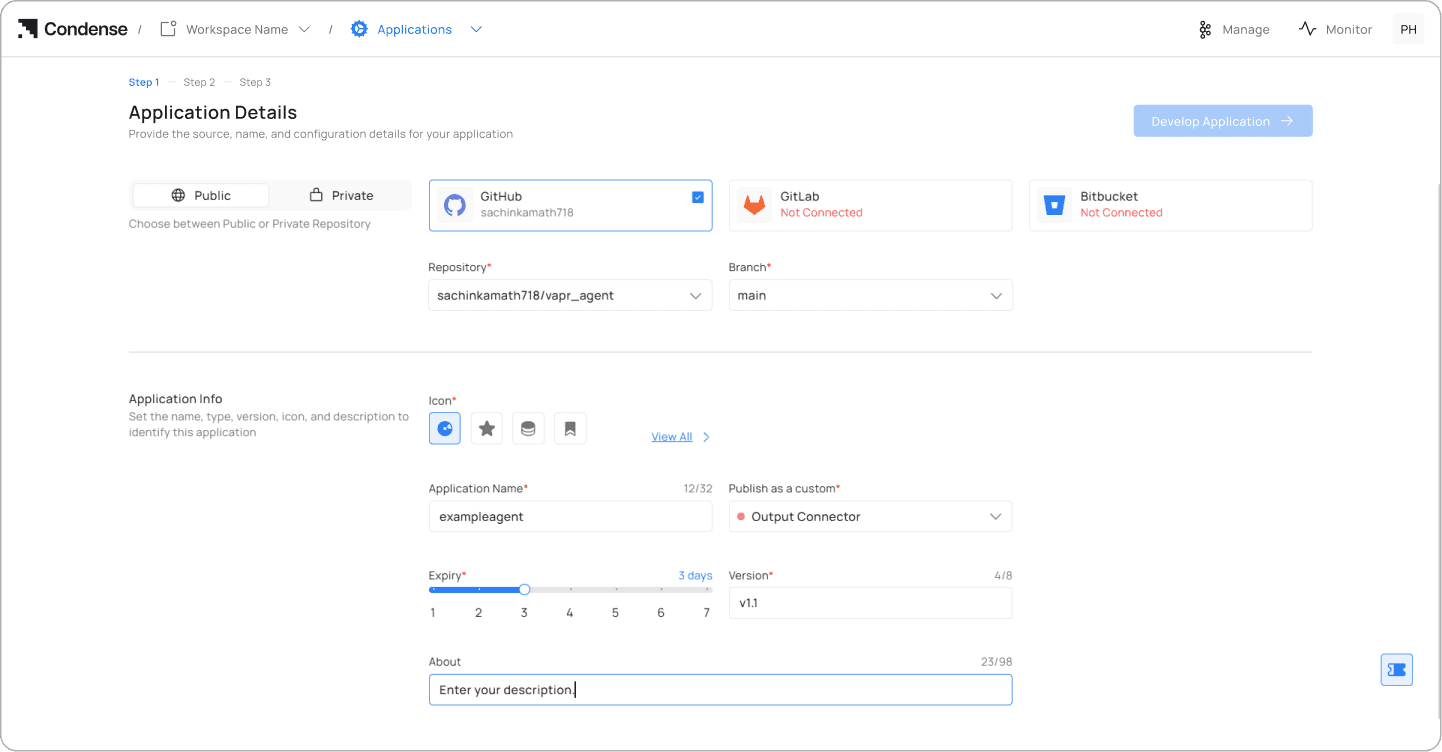
Connect your GitHub, GitLab, or Bitbucket account. Select the repository and branch to deploy from.
Step 3
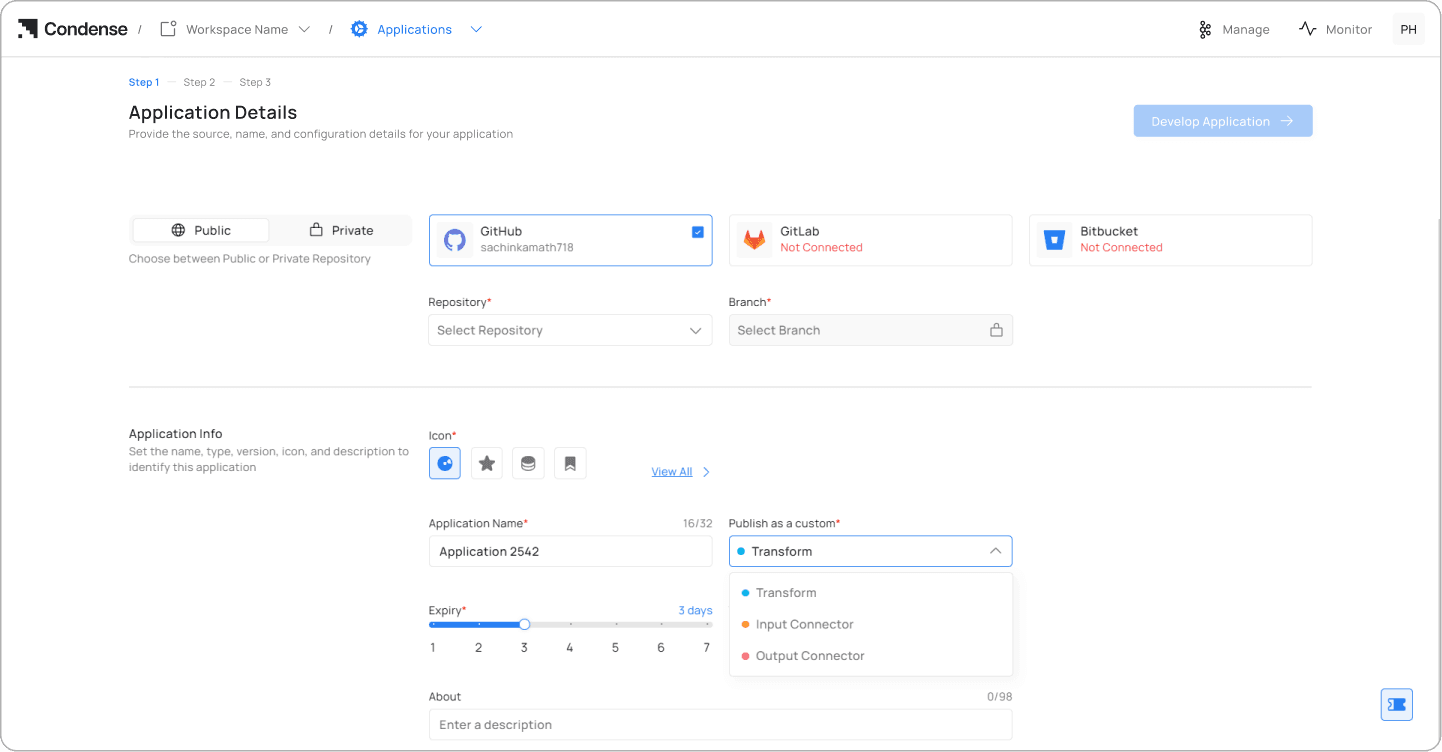
Under Publish As, select Output Connector, add a description, set an expiry period, and click Publish Application.
Step 4
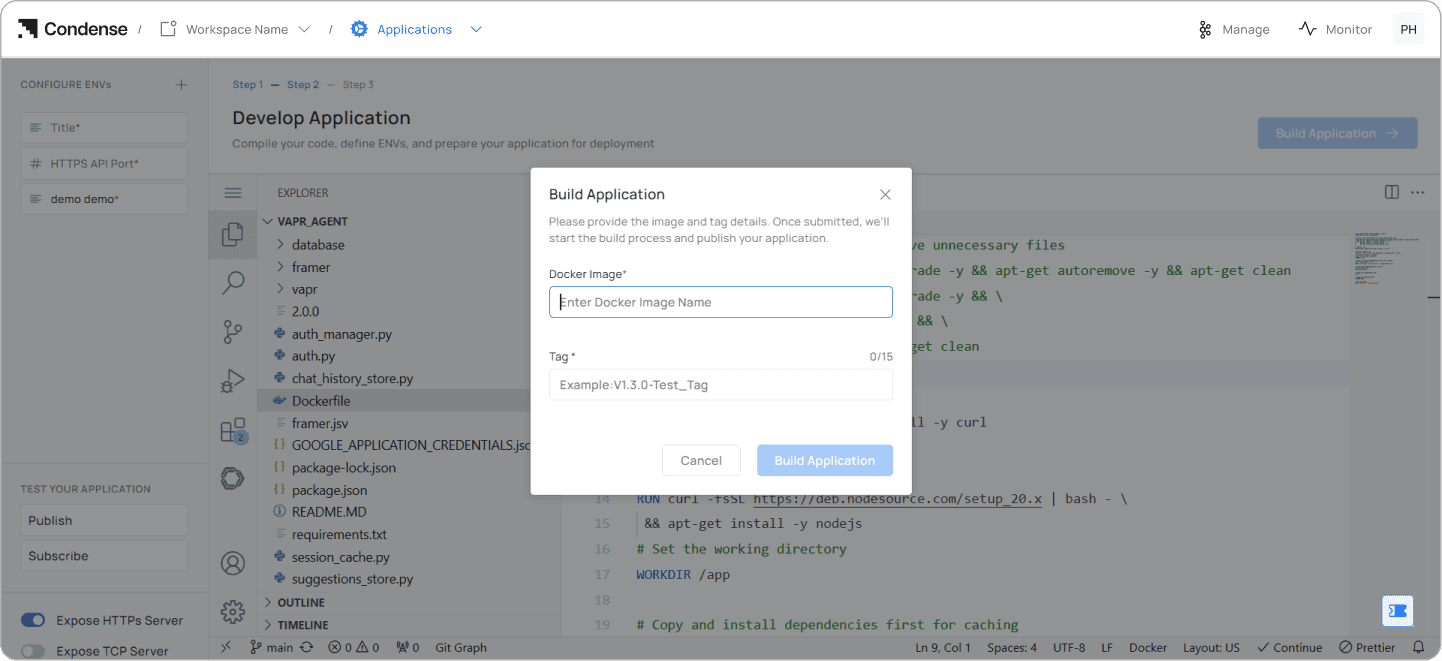
Confirm the Dockerfile is at the root of the repository. The built-in VS Code interface lets you make and push changes directly from the browser without switching to a local terminal.
Step 5
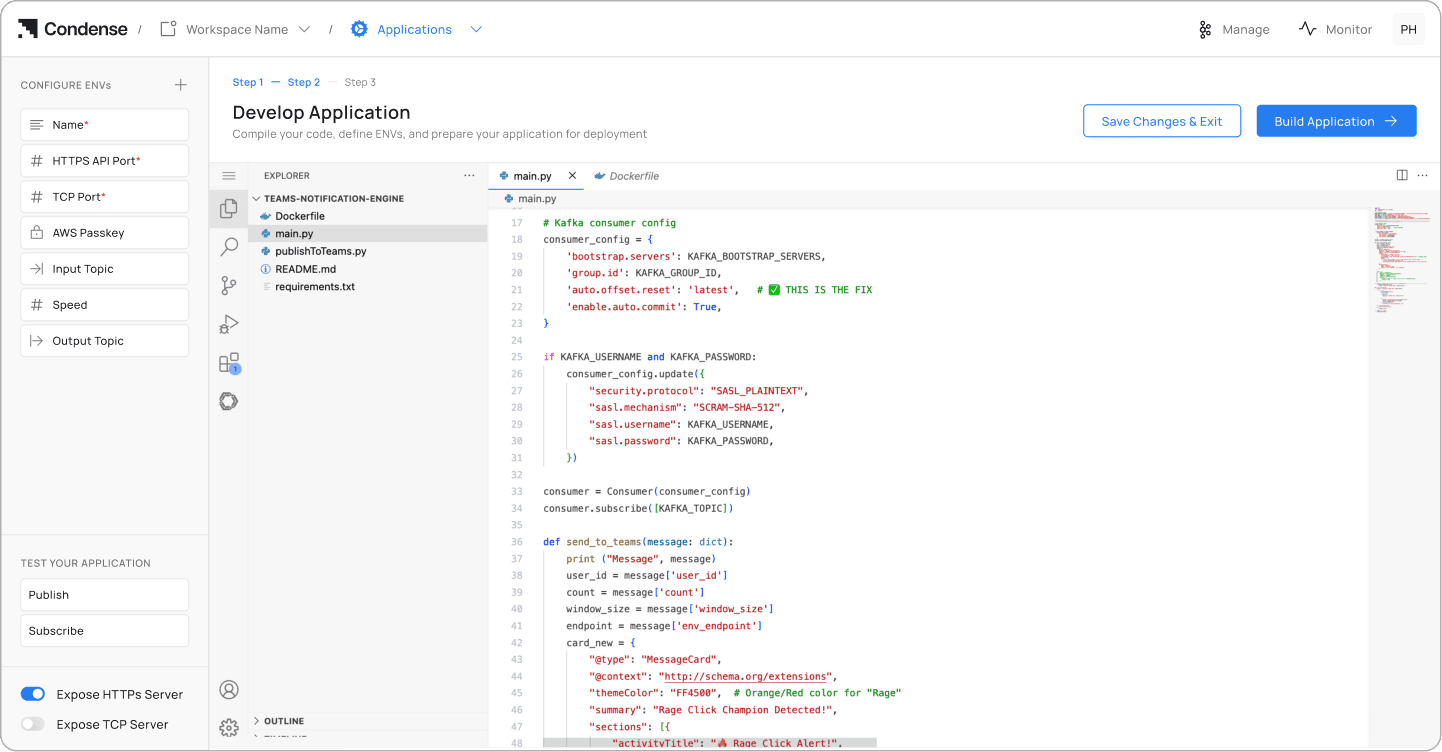
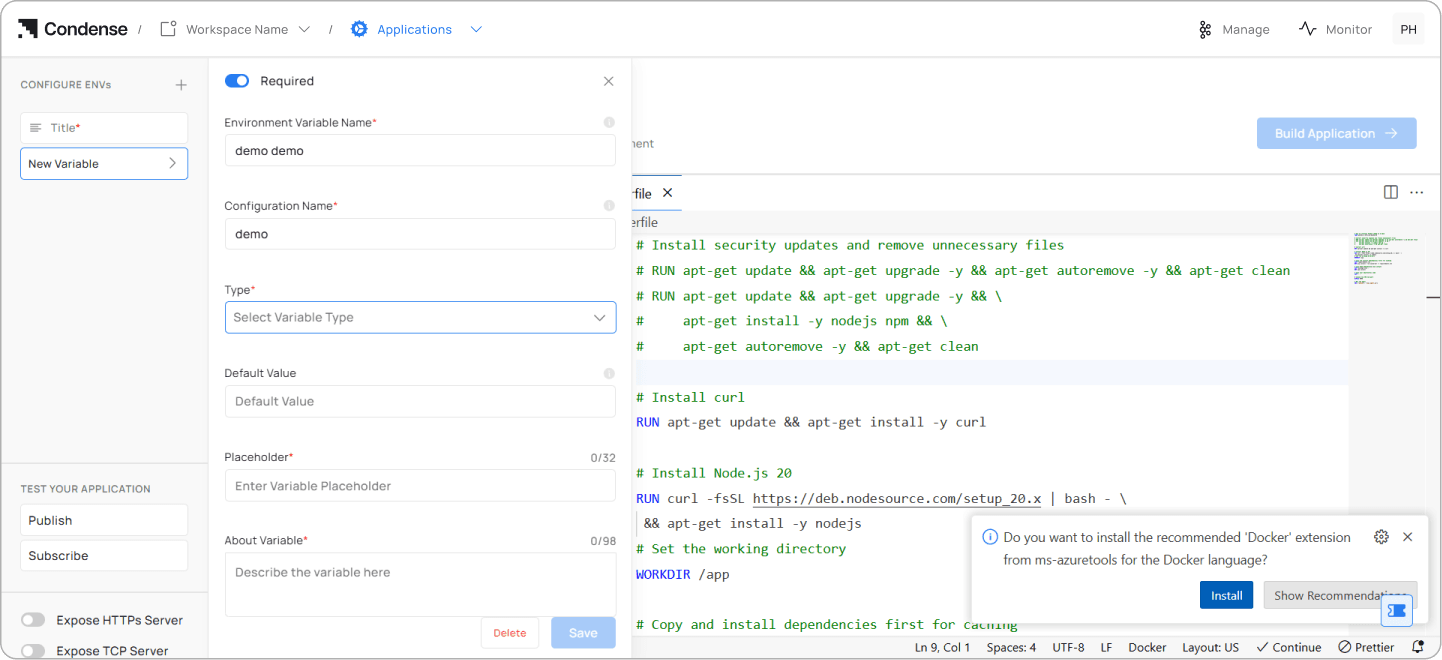
Configure environment variables using + Configure Envs. Add variable names, configuration names, and values, then save.
Step 6
Choose HTTPS or TCP exposure depending on your application's requirements.
Step 7
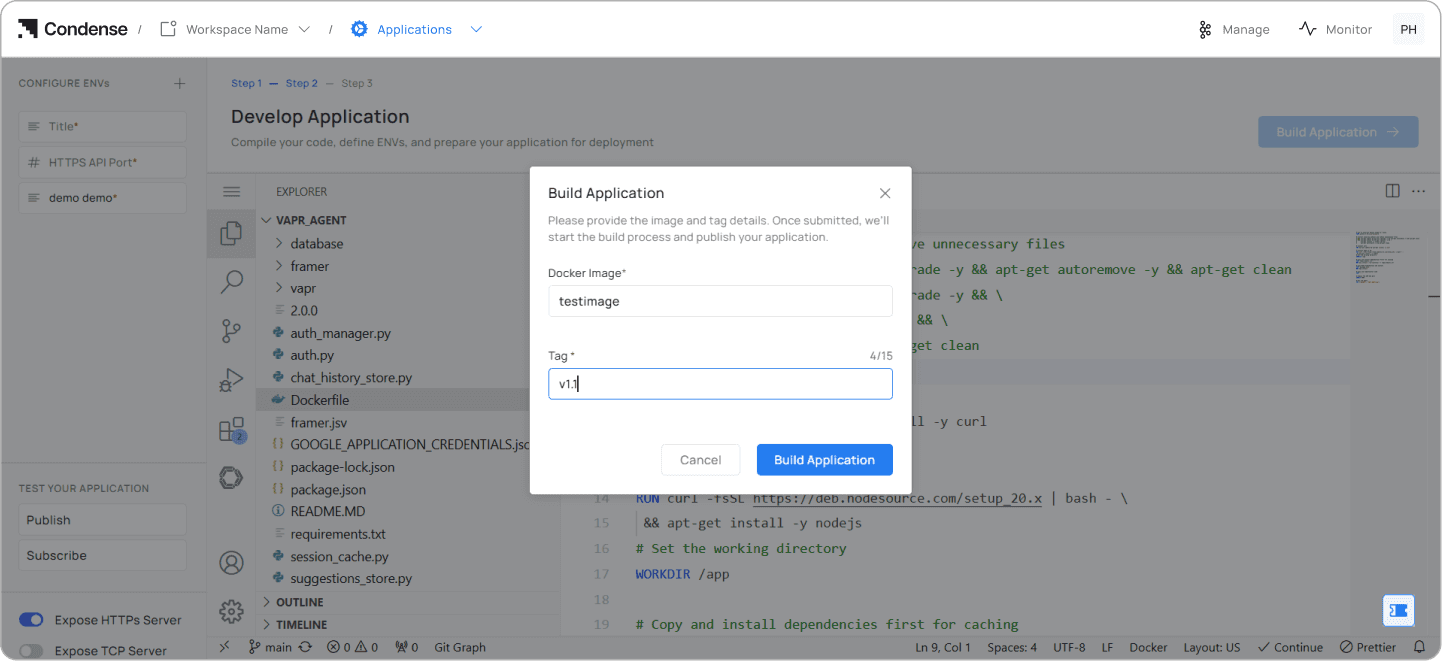
Click Build Application, enter an image name and tag, and start the build. Logs stream in real time so you can catch failures immediately.
Step 8
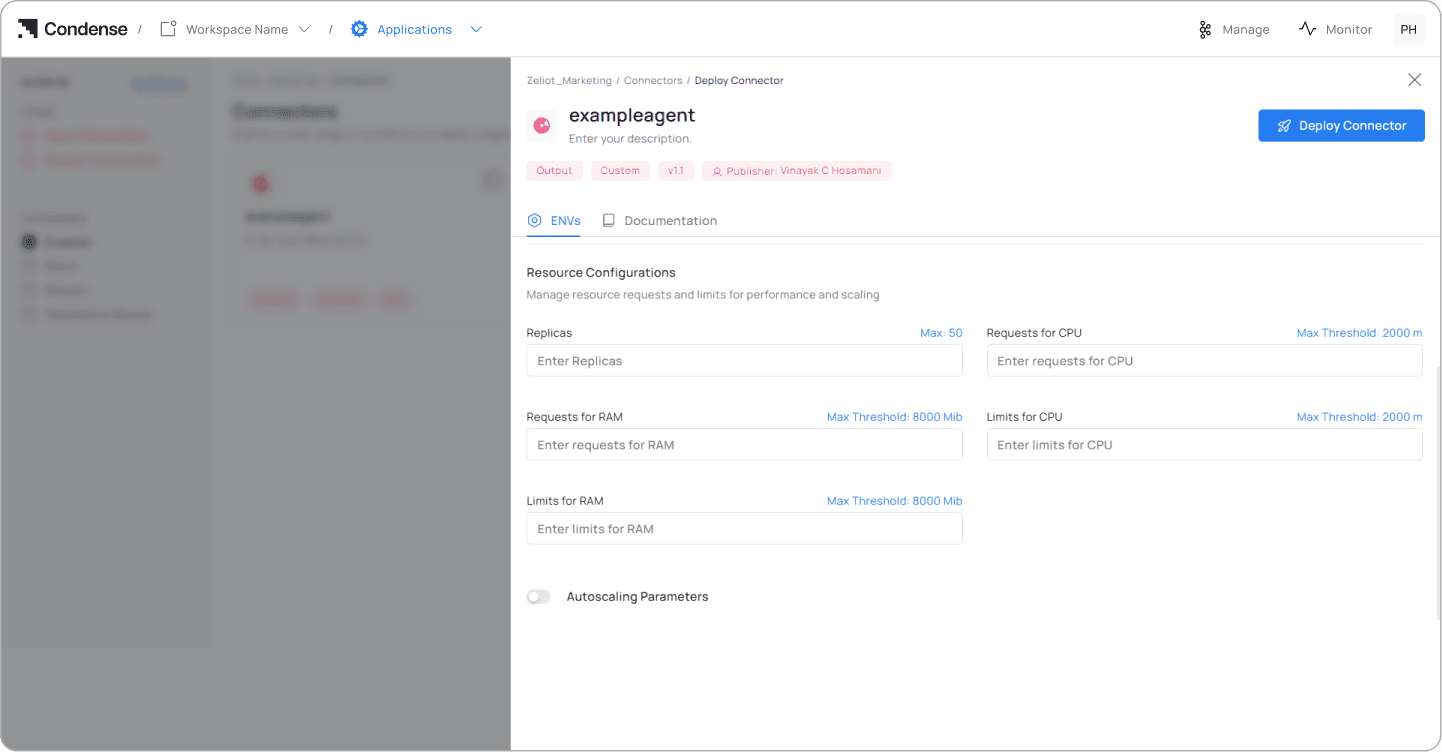
Once the build completes, click Publish Application, select Custom from the Categories dropdown, adjust environment variables and resource settings if needed, and click Deploy Connector.
The assistant is now live. The deployed connector view gives you the ingress path, environment variable overrides, and application logs. Use the Start button in the Logs tab to confirm it's running correctly.
Our Deployment
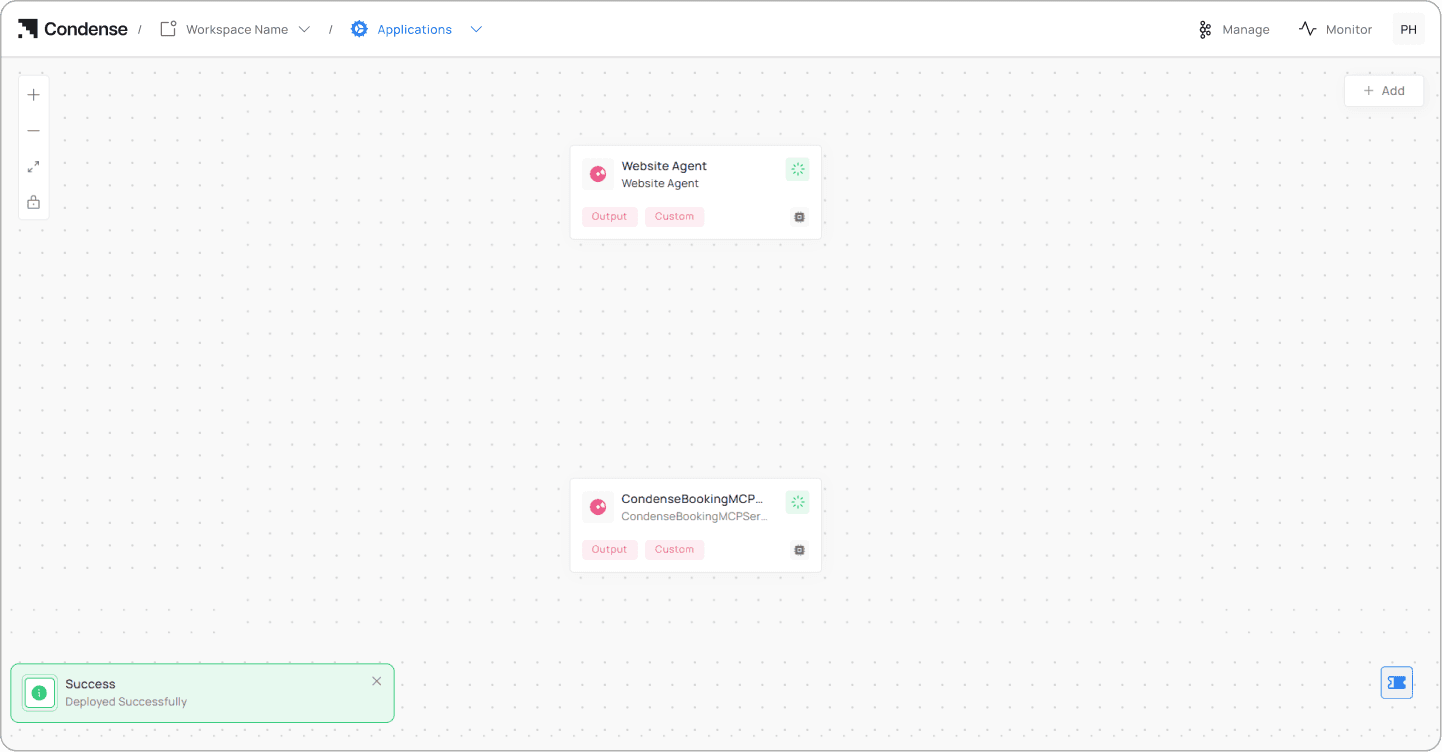
The assistant is live on zeliot.in. It queries content from zeliot.in and docs.zeliot.in, surfaces blogs and eBooks from the resources section, handles meeting booking through Microsoft Graph, and guides users through Condense sign-up, all from a single chat interface.
Vapr manages orchestration: deciding when to retrieve from the vector store, when to invoke the scheduling tool, when to surface a blog or eBook, and when to guide a sign-up. The entire stack runs on Condense on Zeliot's cloud the same platform we're recommending to customers for their own streaming infrastructure.
What We Learned Building This
Content quality matters more than retrieval sophistication
Cleaning navigation, sidebars, and framework-generated content before indexing had a bigger impact on answer quality than any retrieval tuning. Bad input produces bad output regardless of how good the retrieval pipeline is.
Two-stage retrieval is non-negotiable for production
The Cross Encoder reranker eliminated the category of answers that were technically sourced from the right general area but missed the specific point the user was asking about. We wouldn't ship a customer-facing assistant without it.
Actions need to be tools, not reasoning
Having Vapr invoke discrete, deterministic tools for booking and sign-up produced far more reliable outcomes than prompting a model to reason through the same actions. For anything that creates a side effect, booking a calendar slot, initiating a sign-up use a tool.
Streaming is a UX decision, not a technical nicety
The isolated event loop design adds implementation complexity, but the experience difference for users is real enough that it was worth it.
What It Can Do
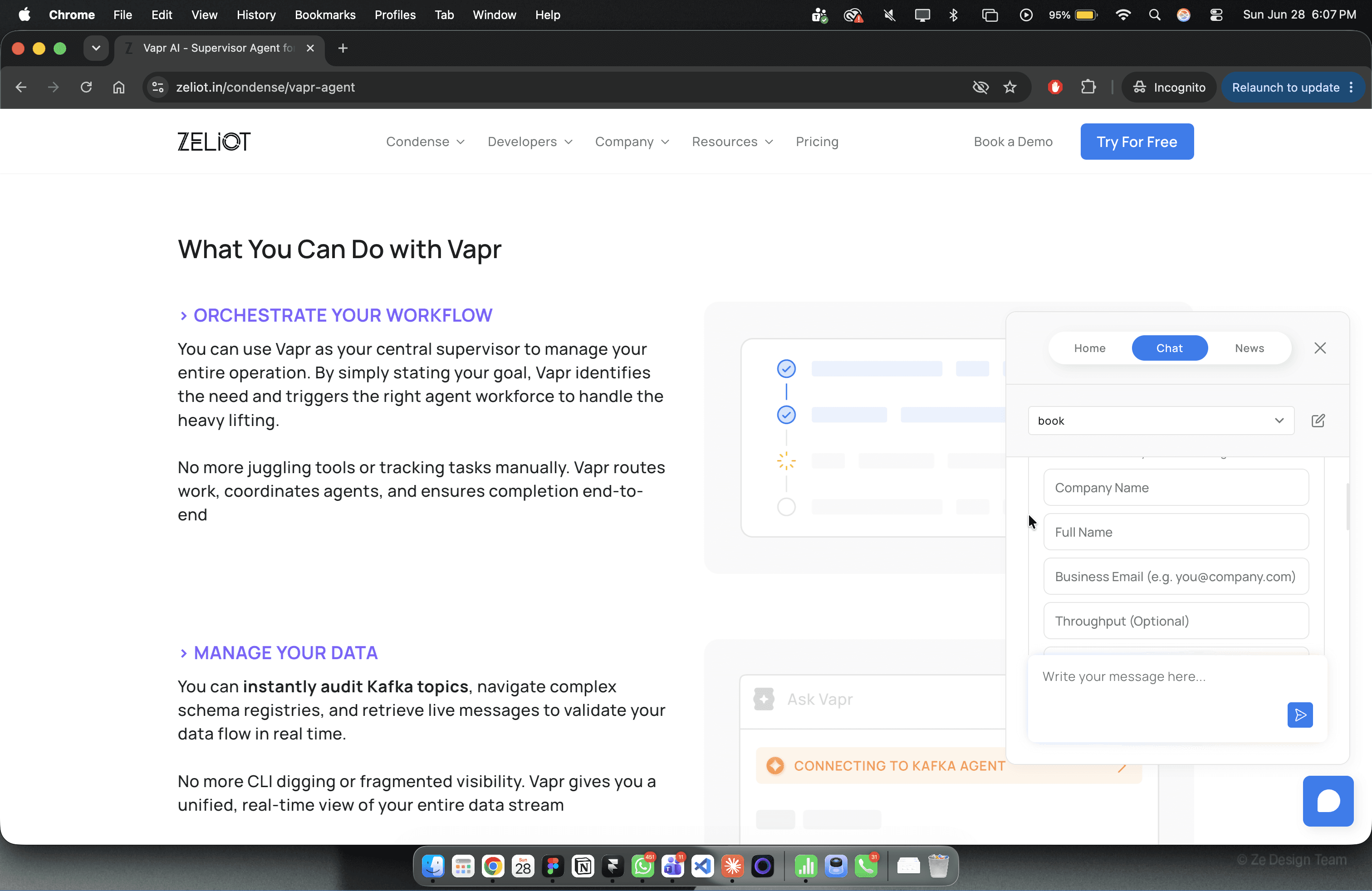
The assistant can answer any question about Zeliot, Condense, or Vapr, Condense Apps, from pricing to compliance certifications to connector specifics. It surfaces blogs and eBooks on demand. It books meetings without leaving the chat. It guides users through Condense sign-up. And it does all of this while maintaining context across a full conversation.
More than anything, it removes the gap between "I have a question" and "I have an answer", which is the thing a website is supposed to do but, manages to do it more easily and quickly.
Frequently Asked Questions (FAQs)
Ready to Switch to Condense and Simplify Real-Time Data Streaming? Get Started Now!
Switch to Condense for a fully managed, Kafka-native platform with built-in connectors, observability, and BYOC support. Simplify real-time streaming, cut costs, and deploy applications faster.