Unlock Kafka Schemas with Karapace: Hands-On Guide

Written by
Written by
Harish Anand
Harish Anand
|
Software Engineer - I
Software Engineer - I
Published on
Published on
Technology
Apache Kafka


TL;DR
Kafka handles event streaming: producers write to topics, consumers read. JSON parsing lags at scale, so use Karapace Schema Registry (open-source Confluent alternative) with Protobuf for efficient, schema-enforced serialization. This Java Spring Boot guide shows producer/consumer setup, compile .proto schemas, use TopicNameStrategy, SCRAM/Basic auth tested on Condense's Kafka+Karapace. Ideal for structured telematics; avoid for ad-hoc data.
A Brief Introduction to Kafka
Kafka is a distributed system consisting of servers and clients that communicate using the TCP network protocol. Kafka is used as an event-based system that records a specific thing that has happened.
For example "Transaction of 500 USD has occurred in Alice's account."
Events are created and written to Kafka by client applications called Producers and consumed by client applications called Consumers. Kafka provides the feature to create Topics which can be used to group events as per the user's requirements. Single or multiple producers can produce events/messages to a single topic, and single or multiple consumers can consume from one topic.
Common Throughput Issues When Operating at Scale
By default, Kafka producers and consumers exchange event data in the String UTF-8 format. Even though Kafka offers features to compress the data using gzip and other algorithms, this creates additional overhead on the producers and consumers to decompress the data and then validate it. Most events are generally sent in the JSON format, which is helpful for human readability, but this slows down the whole pipeline if high throughput if needed. The effects can only be felt on production clusters where the incoming data transfer rate is high, but the consumers start lagging due to complex JSON deserialization if there are nested JSONs present.
To overcome this issue, we need a different serialization and deserialization format which can reduce the time taken to construct or deconstruct the binary data sequence and ensure that the data follows a certain schema. We can either write our won serializer and deserializer or use open-source libraries from Confluent to achieve it. Confluent offers JSON, Avro and Protobuf serde (serializer and deserializers) to compact the data and enforce a schema on it.
Karapace Schema Registry & Kafka
Karapace is an open source near drop-in replacement for the Confluent Schema Registry which aims to be compatible with the Confluent Schema Registry Client libraries which are offered in Java, C# etc. In this blog post, we will be looking at the Java libraries for implementing a producer and consumer.
The Schema Registry is a separate component from Kafka as it is not offered by Apache. It is designed to run as a separate node which is dependent on Kafka, but Kafka does not need Schema Registry as a core functionality. This can lead to confusion as Kafka does not enforce the schema for a particular topic or record, but the producer and consumer can choose to do so by using the Schema Registry. Unlike a relational database schema where a table can enforce a very strict schema down to the datatypes, size of the data in a column and other constraints regardless of the users connecting to it, a different Kafka producers could still write very different data to a topic while not following a schema or format causing downstream issues in a pipeline. To avoid this, we can use different strategies to minimize the chances of schema drift or unintended data storage in topics which we will cover in this post.
DISCLAIMER
Setting up Kafka and Schema Registry in a local environment requires a lot of configuration steps. I will be using a platform called Condense by the company Zeliot which provides an integrated Kubernetes + Kafka + Schema Registry (Karapace) along with the options to set ACLs for Kafka and Schema Registry from a browser UI instead of a command line. I will cover setting up a local Kafka cluster with Schema Registry in a separate blog post.
How Kafka & Schema Registry Work Together
Since Kafka and Schema Registry are separate components, only the producers and consumer are responsible for setting up a loosely coupled connection between them. A basic flow diagram of how they work together are given below:
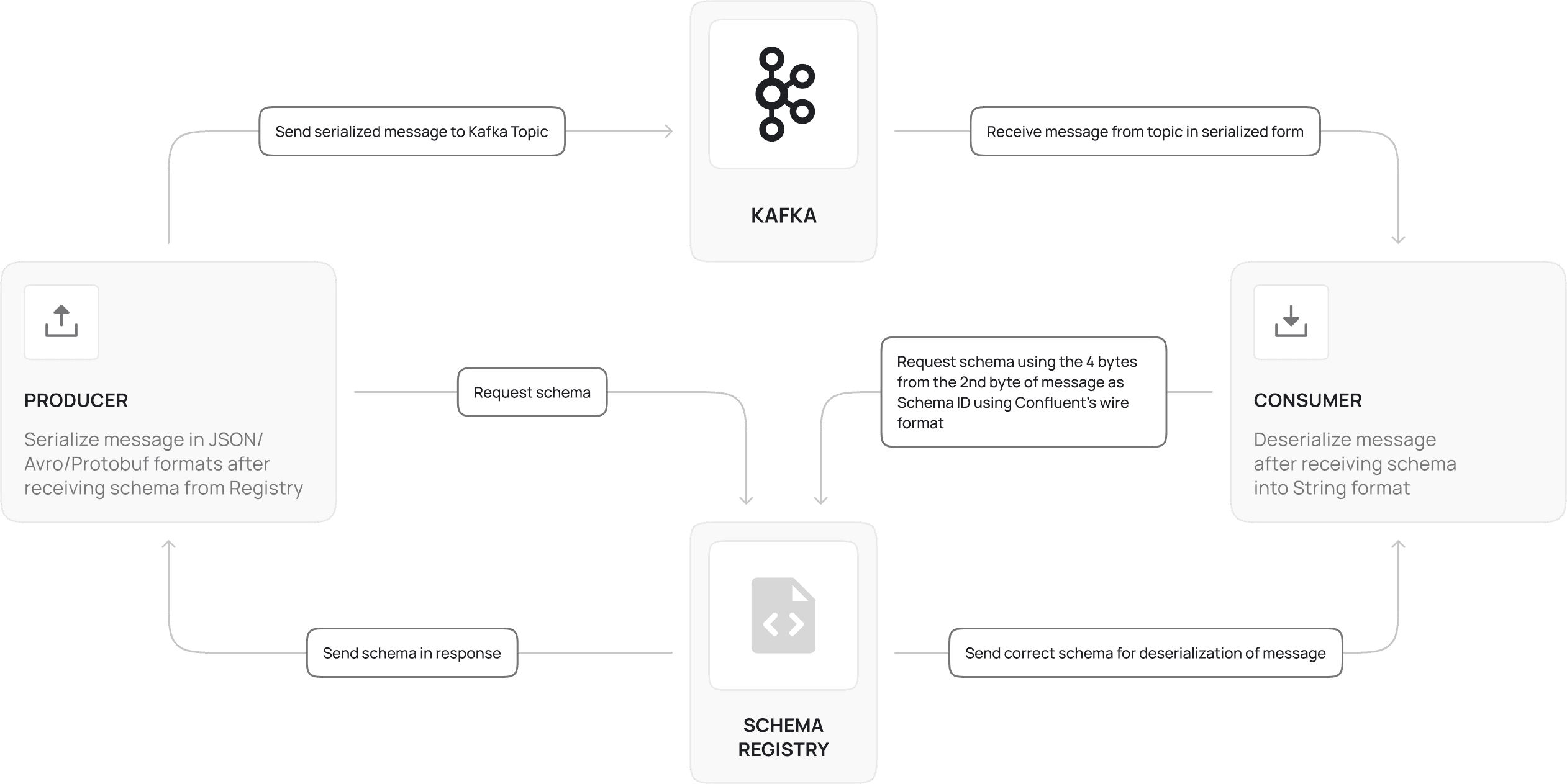
Here, this architecture assumes that we are using the Confluent Schema Registry Client in both the producer and consumer. We can use compiled classes without the Schema Registry, but that approach has disadvantages such as lack of versioning support without downtime, maintenance of compiled classes, complex logic and library setup needed to generate and use compiled classes.
With Kafka 4.0 and its KRaft-only architecture, schema registry compatibility is an important consideration for teams upgrading.
The process of generating a message in JSON or Avro or Protobuf format involves the producer specifying the naming strategy and version of the schema (default is latest version) which is fetched from the Confluent client and then we need to use the format-specific libraries as specified in the next sections to convert the message from String format to the required format. Note that the message format must be the same as specified in the schema type or else the Kafka producer library will throw a serialization exception. After serialization, this message is sent to the Kafka topic which is specified.
For the consumer, the Confluent client library automatically sees the 1st byte called the magic byte which determines whether the message is using the Schema Registry or not. 1 means yes and 0 means no. If yes, the next 4 bytes of the message determine the schema id present in the Registry, and the client automatically fetches the correct schema for the message. Then the message is deserialized into the String UTF-8 format and can be viewed and processed normally.
Subject Naming Strategies
There are 3 different naming strategies offered by the Confluent Schema Registry Client libraries to determine how the serializer libraries fetch the schema to correctly serialize the message.
TopicName Strategy
This is the default strategy for naming the subject and is <topic-name>+”-value”. If a topic name is car-topic, then the corresponding subject name is car-topic-value. For the key, the subject name is <topic-name>+”-key”. The serializer and deserializer using this strategy assumes that all the messages in this topic correspond to this schema and presence of messages in other formats can disrupt the consumer with errors. Best used in cases where the topic name is used to differentiate the type of data present in the topic.
RecordNameStrategy
This is a naming strategy for naming the subject using the record name of the schema (in the above example the Record Name is Car). This does not tie the producer and consumer to a particular topic but consuming messages in other formats/schemas can cause the consumer to crash if error handling mechanisms aren’t implemented correctly. Best used in cases where producers need to immediately push data into any available topic with high number of partitions, replication factors etc.
TopicRecordNameStrategy
This strategy uses both the topic name and the record name to determine the subject name. This strategy can be used when we are sure that a topic can have multiple record types of records.
Setting Up a Producer with Protobuf Schema
First, we need to register a subject within Karapace which defines the schema of the message containing the fields and its data types. I am defining the below proto schema:
syntax = "proto3";


package com.example.GenericProducer.schema;

option java_package = "com.example.GenericProducer.schema";

option java_outer_classname = "CarProto";


message Car {

  string carId = 1;

  string carNumber = 2;

  double speed = 3;

  double latitude = 4;

  double longitude = 5;

}
syntax = "proto3";


package com.example.GenericProducer.schema;

option java_package = "com.example.GenericProducer.schema";

option java_outer_classname = "CarProto";


message Car {

  string carId = 1;

  string carNumber = 2;

  double speed = 3;

  double latitude = 4;

  double longitude = 5;

}
This defines a schema in which the data should contain the fields carId ,carNumber of type string and speed, latitude, longitude of type double. To get higher data generation speed, I am using compiled classes for Protobuf.
In your Spring Java project, create a folder in src/main/java named schema and create a file named Car.proto. Paste the above schema and modify your java package and java_package to your requirements.
Next install the protobuf compiler for your OS by following instructions here. Next, go to the root directory of your project and enter the command to compile the proto file and generate a compiled class. Modify the path if needed. The first parameter sets the path for the output compiled class and the second accepts the path for the proto file.
protoc --java_out=src/main/java/ src/main/java/schema/car.proto
protoc --java_out=src/main/java/ src/main/java/schema/car.proto
We can check the generated file to see if it is created or not. Do not edit the file.
Next, we can add the required dependencies in the pom.xml for the producer application. Below are the following dependencies. We can use the latest versions of these libraries from the mvn repository and the Confluent repository.
<dependency>

  <groupId>org.apache.kafka</groupId>

  <artifactId>kafka-clients</artifactId>

  <version>3.9.0</version>

</dependency>

<dependency>

  <groupId>io.confluent</groupId>

  <artifactId>kafka-protobuf-serializer</artifactId>

  <version>8.0.1</version>

</dependency>

<dependency>

  <groupId>io.confluent</groupId>

  <artifactId>kafka-protobuf-provider</artifactId>

  <version>8.0.1</version>

</dependency>

<dependency>

  <groupId>com.google.protobuf</groupId>

  <artifactId>protobuf-java</artifactId>

  <version>4.33.4</version>

  <scope>compile</scope>

</dependency>
<dependency>

  <groupId>org.apache.kafka</groupId>

  <artifactId>kafka-clients</artifactId>

  <version>3.9.0</version>

</dependency>

<dependency>

  <groupId>io.confluent</groupId>

  <artifactId>kafka-protobuf-serializer</artifactId>

  <version>8.0.1</version>

</dependency>

<dependency>

  <groupId>io.confluent</groupId>

  <artifactId>kafka-protobuf-provider</artifactId>

  <version>8.0.1</version>

</dependency>

<dependency>

  <groupId>com.google.protobuf</groupId>

  <artifactId>protobuf-java</artifactId>

  <version>4.33.4</version>

  <scope>compile</scope>

</dependency>
To add the io.confluent packages, we need to add the Confluent repository as these packages are not present in the Maven repository.
We can add it just before the </project> tag in the pom.xml like this:
...

</plugin>

</plugins>

</build>

<repositories>

<repository>

<id>confluent</id>

<name>Confluent Maven Repository</name>

<url>https://packages.confluent.io/maven/</url>

</repository>

</repositories>

</project>
...

</plugin>

</plugins>

</build>

<repositories>

<repository>

<id>confluent</id>

<name>Confluent Maven Repository</name>

<url>https://packages.confluent.io/maven/</url>

</repository>

</repositories>

</project>
Since this is a sample producer, we shall randomly generate data every 5 seconds to Kafka to simulate a telematics data. We shall define a class just like our schema.
import lombok.AllArgsConstructor;

import lombok.Data;

import lombok.NoArgsConstructor;


@Data

@AllArgsConstructor

@NoArgsConstructor

public class Car {

private String carId;

private String carNumber;

private double speed;

private double latitude;

private double longitude;

}
import lombok.AllArgsConstructor;

import lombok.Data;

import lombok.NoArgsConstructor;


@Data

@AllArgsConstructor

@NoArgsConstructor

public class Car {

private String carId;

private String carNumber;

private double speed;

private double latitude;

private double longitude;

}
Next, we shall define a KafkaProducer as a Spring component which can be invoked once within a service and be reused.
@Component

public class KafkaProducerClient {


public static final String FALSE = "false";

private static final String CLIENT_ID = "car-producer";

private static final String SECURITY_PROTOCOL = "SASL_PLAINTEXT";

private static final String SASL_MECHANISM = "SCRAM-SHA-512";

private static final String SASL_JAAS_CONFIG = "org.apache.kafka.common.security.scram.ScramLoginModule required username=\"%s\" password=\"%s\";";

private final String bootstrapServerUrl;


public KafkaProducerClient(@Value("${kafka.bootstrap.server.url}") String bootstrapServerUrl) {

this.bootstrapServerUrl = bootstrapServerUrl;

}

public <K, V> KafkaProducer<K, V> getDefaultProducerClientWithoutPartitioner(String username, String password, @Value("${schema.registry.url}") String schemaRegistryUrl) {

Properties props = new Properties();

props.setProperty(ProducerConfig.KEY_SERIALIZER_CLASS_CONFIG, “org.apache.kafka.common.serialization.StringSerializer”);


props.setProperty(ProducerConfig.VALUE_SERIALIZER_CLASS_CONFIG, "io.confluent.kafka.serializers.protobuf.KafkaProtobufSerializer");


props.setProperty(ProducerConfig.BOOTSTRAP_SERVERS_CONFIG, bootstrapServerUrl);

props.setProperty(ProducerConfig.CLIENT_ID_CONFIG, CLIENT_ID);

props.setProperty(ProducerConfig.RETRIES_CONFIG, "0");

props.setProperty(ProducerConfig.MAX_BLOCK_MS_CONFIG, "3000");

props.setProperty(AdminClientConfig.SECURITY_PROTOCOL_CONFIG, SECURITY_PROTOCOL);

props.setProperty(SaslConfigs.SASL_MECHANISM, SASL_MECHANISM);

props.setProperty(SaslConfigs.SASL_JAAS_CONFIG, String.format(SASL_JAAS_CONFIG, username, password));

props.setProperty(AbstractKafkaSchemaSerDeConfig.SCHEMA_REGISTRY_URL_CONFIG, schemaRegistryUrl);

props.setProperty("basic.auth.credentials.source", "USER_INFO");

props.setProperty("basic.auth.user.info", username + ":" + password);

props.setProperty(AbstractKafkaSchemaSerDeConfig.AUTO_REGISTER_SCHEMAS, “true”);

props.setProperty(AbstractKafkaSchemaSerDeConfig.LATEST_COMPATIBILITY_STRICT, "false");

props.setProperty(AbstractKafkaSchemaSerDeConfig.VALUE_SUBJECT_NAME_STRATEGY,

"io.confluent.kafka.serializers.subject.TopicNameStrategy");

return new KafkaProducer<>(props);

}

}
@Component

public class KafkaProducerClient {


public static final String FALSE = "false";

private static final String CLIENT_ID = "car-producer";

private static final String SECURITY_PROTOCOL = "SASL_PLAINTEXT";

private static final String SASL_MECHANISM = "SCRAM-SHA-512";

private static final String SASL_JAAS_CONFIG = "org.apache.kafka.common.security.scram.ScramLoginModule required username=\"%s\" password=\"%s\";";

private final String bootstrapServerUrl;


public KafkaProducerClient(@Value("${kafka.bootstrap.server.url}") String bootstrapServerUrl) {

this.bootstrapServerUrl = bootstrapServerUrl;

}

public <K, V> KafkaProducer<K, V> getDefaultProducerClientWithoutPartitioner(String username, String password, @Value("${schema.registry.url}") String schemaRegistryUrl) {

Properties props = new Properties();

props.setProperty(ProducerConfig.KEY_SERIALIZER_CLASS_CONFIG, “org.apache.kafka.common.serialization.StringSerializer”);


props.setProperty(ProducerConfig.VALUE_SERIALIZER_CLASS_CONFIG, "io.confluent.kafka.serializers.protobuf.KafkaProtobufSerializer");


props.setProperty(ProducerConfig.BOOTSTRAP_SERVERS_CONFIG, bootstrapServerUrl);

props.setProperty(ProducerConfig.CLIENT_ID_CONFIG, CLIENT_ID);

props.setProperty(ProducerConfig.RETRIES_CONFIG, "0");

props.setProperty(ProducerConfig.MAX_BLOCK_MS_CONFIG, "3000");

props.setProperty(AdminClientConfig.SECURITY_PROTOCOL_CONFIG, SECURITY_PROTOCOL);

props.setProperty(SaslConfigs.SASL_MECHANISM, SASL_MECHANISM);

props.setProperty(SaslConfigs.SASL_JAAS_CONFIG, String.format(SASL_JAAS_CONFIG, username, password));

props.setProperty(AbstractKafkaSchemaSerDeConfig.SCHEMA_REGISTRY_URL_CONFIG, schemaRegistryUrl);

props.setProperty("basic.auth.credentials.source", "USER_INFO");

props.setProperty("basic.auth.user.info", username + ":" + password);

props.setProperty(AbstractKafkaSchemaSerDeConfig.AUTO_REGISTER_SCHEMAS, “true”);

props.setProperty(AbstractKafkaSchemaSerDeConfig.LATEST_COMPATIBILITY_STRICT, "false");

props.setProperty(AbstractKafkaSchemaSerDeConfig.VALUE_SUBJECT_NAME_STRATEGY,

"io.confluent.kafka.serializers.subject.TopicNameStrategy");

return new KafkaProducer<>(props);

}

}
Here, we set the properties of the key and value serializers to String and Protobuf respectively. We then set the authentication mechanism for the Kafka cluster (SCRAM-SHA-512 in my case) with the username and password.
I am using basic authentication in Karapace, so we need to set the "basic.auth.credentials.source" to “USER_INFO” which sets the KafkaProducer property to authenticate with the Schema registry using the Basic Authentication headers. We then need to set "basic.auth.user.info" with the user’s credentials in the format shown in the code. If we are not using any authentication for Schema Registry, we can omit these properties.
I am using the Topic Name Strategy for subjects for simplicity and demo purposes for the AbstractKafkaSchemaSerDeConfig.VALUE_SUBJECT_NAME_STRATEGY property. We can set AUTO_REGISTER_SCHEMAS to true if the schema doesn’t exist in the registry or it will create a new version of the schema if the underlying compiled class schema has changed. The created subject will follow the naming strategy as defined in the above property. To allow compatibility between various versions and generate messages, we have set the LATEST_COMPATIBILITY_STRICT to false.
Now, we shall set up a random data generator class to generate some sample data.
@Component

@NoArgsConstructor

public class RandomCarDataGenerator {


@Value("${CAR_ID}")

private String carIDString;


@Value("${CAR_NUMBER}")

private String carNumberString;


private static final Random random = new Random();


public Car generateRandomCar() {

Car car = new Car();

String carId = carIDString;

String carNumber = carNumberString;


if (carId == null || carId.isEmpty()) {

carId = "default-car-id";

}

if (carNumber == null || carNumber.isEmpty()) {

carNumber = "default-car-number";

}

car.setCarId(carId);

car.setCarNumber(carNumber);

car.setSpeed(generateRandomSpeed());

car.setLatitude(generateRandomLatitude());

car.setLongitude(generateRandomLongitude());

return car;

}


private static double generateRandomLatitude() {

// Range: -90 to 90

return -90 + (180 * random.nextDouble());

}


private static double generateRandomLongitude() {

// Range: -180 to 180

return -180 + (360 * random.nextDouble());

}


private static double generateRandomSpeed() {

// Random speed between 0 and 180 km/h

return random.nextDouble() * 180;

}

}
@Component

@NoArgsConstructor

public class RandomCarDataGenerator {


@Value("${CAR_ID}")

private String carIDString;


@Value("${CAR_NUMBER}")

private String carNumberString;


private static final Random random = new Random();


public Car generateRandomCar() {

Car car = new Car();

String carId = carIDString;

String carNumber = carNumberString;


if (carId == null || carId.isEmpty()) {

carId = "default-car-id";

}

if (carNumber == null || carNumber.isEmpty()) {

carNumber = "default-car-number";

}

car.setCarId(carId);

car.setCarNumber(carNumber);

car.setSpeed(generateRandomSpeed());

car.setLatitude(generateRandomLatitude());

car.setLongitude(generateRandomLongitude());

return car;

}


private static double generateRandomLatitude() {

// Range: -90 to 90

return -90 + (180 * random.nextDouble());

}


private static double generateRandomLongitude() {

// Range: -180 to 180

return -180 + (360 * random.nextDouble());

}


private static double generateRandomSpeed() {

// Random speed between 0 and 180 km/h

return random.nextDouble() * 180;

}

}
Next, we shall setup the producer class which initializes a KafkaProducer and has a lightweight function to convert the generated data into a Protobuf message using the earlier generated class “CarProto.Car”. Ensure the environment variables are configured properly to avoid errors.
@Service

@RequiredArgsConstructor

@Slf4j

public class ProtobufProducer {


private static final String PROTO_TOPIC = "test-schema-car-protobuf";


private final KafkaProducerClient kafkaProducerClient;

private KafkaProducer<String, CarProto.Car> protoProducer;


@Value("${schema.registry.url}")

private String schemaRegistryUrl;


@Value("${kafka.username}")

private String username;


@Value("${kafka.password}")

private String password;


@PostConstruct

private void initProtoProducer(){

protoProducer = kafkaProducerClient.getDefaultProducerClientWithoutPartitioner(

username, password, schemaRegistryUrl);

}


public void produceCarProto(Car car) {

try {

// Direct conversion from POJO to Protobuf - NO JSON overhead!

CarProto.Car protoCar = CarProto.Car.newBuilder()

.setCarId(car.getCarId())

.setCarNumber(car.getCarNumber())

.setSpeed(car.getSpeed())

.setLatitude(car.getLatitude())

.setLongitude(car.getLongitude())

.build();


ProducerRecord<String, CarProto.Car> producerRecord =

new ProducerRecord<>(PROTO_TOPIC, car.getCarId(), protoCar);

protoProducer.send(producerRecord, (metadata, exception) -> {

if (exception == null) {

log.info("Produced Proto message topic={} partition={} offset={}",

metadata.topic(), metadata.partition(), metadata.offset());

} else {

log.error("Error producing Proto message", exception);

}

});

} catch (Exception e) {

log.error("Error producing Proto message", e);

}

}

}
@Service

@RequiredArgsConstructor

@Slf4j

public class ProtobufProducer {


private static final String PROTO_TOPIC = "test-schema-car-protobuf";


private final KafkaProducerClient kafkaProducerClient;

private KafkaProducer<String, CarProto.Car> protoProducer;


@Value("${schema.registry.url}")

private String schemaRegistryUrl;


@Value("${kafka.username}")

private String username;


@Value("${kafka.password}")

private String password;


@PostConstruct

private void initProtoProducer(){

protoProducer = kafkaProducerClient.getDefaultProducerClientWithoutPartitioner(

username, password, schemaRegistryUrl);

}


public void produceCarProto(Car car) {

try {

// Direct conversion from POJO to Protobuf - NO JSON overhead!

CarProto.Car protoCar = CarProto.Car.newBuilder()

.setCarId(car.getCarId())

.setCarNumber(car.getCarNumber())

.setSpeed(car.getSpeed())

.setLatitude(car.getLatitude())

.setLongitude(car.getLongitude())

.build();


ProducerRecord<String, CarProto.Car> producerRecord =

new ProducerRecord<>(PROTO_TOPIC, car.getCarId(), protoCar);

protoProducer.send(producerRecord, (metadata, exception) -> {

if (exception == null) {

log.info("Produced Proto message topic={} partition={} offset={}",

metadata.topic(), metadata.partition(), metadata.offset());

} else {

log.error("Error producing Proto message", exception);

}

});

} catch (Exception e) {

log.error("Error producing Proto message", e);

}

}

}
The above code initializes an KafkaProducer at startup and whenever the producerCarProto is called, the builder associated with the CarProto.Car is built from the car object and a ProducerRecord is initialized with the CarProto.Car type. Then the protobuf message is sent to the Kafka topic test-schema-car-protobuf.
Now, we shall initialize a class to periodically send messages every 5 seconds.
@Service

@RequiredArgsConstructor

public class ProducerScheduleService {


private final RandomCarDataGenerator carDataGenerator;

private final ProtobufProducer protobufProducer;

private final AvroProducer avroProducer;

@Scheduled(fixedRate = 5000)

public void produceCarToBothFormats() {

Car car = carDataGenerator.generateRandomCar(); // generate once

@Cleanup

ExecutorService executorService = Executors.newVirtualThreadPerTaskExecutor();

executorService.submit(()->protobufProducer.produceCarProto(car));

}

}
@Service

@RequiredArgsConstructor

public class ProducerScheduleService {


private final RandomCarDataGenerator carDataGenerator;

private final ProtobufProducer protobufProducer;

private final AvroProducer avroProducer;

@Scheduled(fixedRate = 5000)

public void produceCarToBothFormats() {

Car car = carDataGenerator.generateRandomCar(); // generate once

@Cleanup

ExecutorService executorService = Executors.newVirtualThreadPerTaskExecutor();

executorService.submit(()->protobufProducer.produceCarProto(car));

}

}
This will produce a Protobuf message to the Kafka topic every 5 seconds with random data.
Similarly, we shall have a separate consumer which can consume messages from this topic and deserialize these messages faster than normal String JSON format. Let us create a new Spring Boot service with a Kafka Consumer which is setup with a Protobuf deserializer and specifically requests this schema to deserialize the messages.
@Component

public class KafkaConsumerClient {


public static final String FALSE = "false";

private static final String GROUP_ID = "car-consumer";

private static final String CLIENT_ID = "car-consumer1";

private static final String SECURITY_PROTOCOL = "SASL_PLAINTEXT";

private static final String SASL_MECHANISM = "SCRAM-SHA-512";

private static final String SASL_JAAS_CONFIG = "org.apache.kafka.common.security.scram.ScramLoginModule required username=\"%s\" password=\"%s\";";

private final String bootstrapServerUrl;


public KafkaConsumerClient(@Value("${kafka.bootstrap.server.url}") String bootstrapServerUrl) {

this.bootstrapServerUrl = bootstrapServerUrl;

}


public <K, V> KafkaConsumer<K, V> getDefaultConsumer(String username, String password, @Value("${schema.registry.url}") String schemaRegistryUrl){

Properties props = new Properties();

props.put(ConsumerConfig.BOOTSTRAP_SERVERS_CONFIG, bootstrapServerUrl);

props.put(ConsumerConfig.KEY_DESERIALIZER_CLASS_CONFIG, "org.apache.kafka.common.serialization.StringDeserializer");

props.put(ConsumerConfig.VALUE_DESERIALIZER_CLASS_CONFIG, "io.confluent.kafka.serializers.protobuf.KafkaProtobufDeserializer");

props.put(ConsumerConfig.GROUP_ID_CONFIG, GROUP_ID);

props.put(ConsumerConfig.CLIENT_ID_CONFIG, CLIENT_ID);

props.put(ConsumerConfig.AUTO_OFFSET_RESET_CONFIG, "earliest");

props.put(ConsumerConfig.ENABLE_AUTO_COMMIT_CONFIG, "true");

props.put(ConsumerConfig.MAX_POLL_RECORDS_CONFIG, 100);

props.put(ConsumerConfig.MAX_POLL_INTERVAL_MS_CONFIG, 30000);

props.setProperty(AdminClientConfig.SECURITY_PROTOCOL_CONFIG, SECURITY_PROTOCOL);

props.setProperty(SaslConfigs.SASL_MECHANISM, SASL_MECHANISM);

props.setProperty(SaslConfigs.SASL_JAAS_CONFIG, String.format(SASL_JAAS_CONFIG, username, password));

props.setProperty(AbstractKafkaSchemaSerDeConfig.SCHEMA_REGISTRY_URL_CONFIG, schemaRegistryUrl);

props.setProperty("basic.auth.credentials.source", "USER_INFO");

props.setProperty("basic.auth.user.info", username + ":" + password);

props.put("specific.protobuf.value.type", "com.example.schema.CarProto$Car");

return new KafkaConsumer<>(props);

}

}
@Component

public class KafkaConsumerClient {


public static final String FALSE = "false";

private static final String GROUP_ID = "car-consumer";

private static final String CLIENT_ID = "car-consumer1";

private static final String SECURITY_PROTOCOL = "SASL_PLAINTEXT";

private static final String SASL_MECHANISM = "SCRAM-SHA-512";

private static final String SASL_JAAS_CONFIG = "org.apache.kafka.common.security.scram.ScramLoginModule required username=\"%s\" password=\"%s\";";

private final String bootstrapServerUrl;


public KafkaConsumerClient(@Value("${kafka.bootstrap.server.url}") String bootstrapServerUrl) {

this.bootstrapServerUrl = bootstrapServerUrl;

}


public <K, V> KafkaConsumer<K, V> getDefaultConsumer(String username, String password, @Value("${schema.registry.url}") String schemaRegistryUrl){

Properties props = new Properties();

props.put(ConsumerConfig.BOOTSTRAP_SERVERS_CONFIG, bootstrapServerUrl);

props.put(ConsumerConfig.KEY_DESERIALIZER_CLASS_CONFIG, "org.apache.kafka.common.serialization.StringDeserializer");

props.put(ConsumerConfig.VALUE_DESERIALIZER_CLASS_CONFIG, "io.confluent.kafka.serializers.protobuf.KafkaProtobufDeserializer");

props.put(ConsumerConfig.GROUP_ID_CONFIG, GROUP_ID);

props.put(ConsumerConfig.CLIENT_ID_CONFIG, CLIENT_ID);

props.put(ConsumerConfig.AUTO_OFFSET_RESET_CONFIG, "earliest");

props.put(ConsumerConfig.ENABLE_AUTO_COMMIT_CONFIG, "true");

props.put(ConsumerConfig.MAX_POLL_RECORDS_CONFIG, 100);

props.put(ConsumerConfig.MAX_POLL_INTERVAL_MS_CONFIG, 30000);

props.setProperty(AdminClientConfig.SECURITY_PROTOCOL_CONFIG, SECURITY_PROTOCOL);

props.setProperty(SaslConfigs.SASL_MECHANISM, SASL_MECHANISM);

props.setProperty(SaslConfigs.SASL_JAAS_CONFIG, String.format(SASL_JAAS_CONFIG, username, password));

props.setProperty(AbstractKafkaSchemaSerDeConfig.SCHEMA_REGISTRY_URL_CONFIG, schemaRegistryUrl);

props.setProperty("basic.auth.credentials.source", "USER_INFO");

props.setProperty("basic.auth.user.info", username + ":" + password);

props.put("specific.protobuf.value.type", "com.example.schema.CarProto$Car");

return new KafkaConsumer<>(props);

}

}
Here, we initialize a KafkaConsumer which has a String key deserializer and a Protobuf value deserializer. We can set the consumer group id and client id by using the ConsumerConfig.GROUP_ID_CONFIG and ConsumerConfig.CLIENT_ID_CONFIG.
We can set properties such as the auto reset, auto offset commit, polling periods based on the requirements and hardware capabilities.
We need to set the Schema Registry url in the properties and the authentication properties if needed just like the producer.
Since we are using Topic Name Strategy for the subject, we are sure that all messages in this topic will be of the CarProto.Car schema for which we generated the compiled class in the producer. This is an optional property and can be omitted if we are not sure all messages are of the same schema. This helps deserialize messages from the topic if there are multiple topics or Record Naming Strategy or TopicRecord Naming Strategy is used.
We shall now create a consumer class which keeps running once the application is started.
package com.example.GenericConsumer.services;


import java.time.Duration;

import java.util.Collections;

import java.util.concurrent.ExecutorService;

import java.util.concurrent.Executors;

import java.util.concurrent.atomic.AtomicBoolean;


import org.apache.kafka.clients.consumer.ConsumerRecord;

import org.apache.kafka.clients.consumer.ConsumerRecords;

import org.apache.kafka.clients.consumer.KafkaConsumer;

import org.apache.kafka.common.errors.WakeupException;

import org.springframework.beans.factory.annotation.Value;

import org.springframework.context.SmartLifecycle;

import org.springframework.stereotype.Service;


import com.example.GenericConsumer.clients.KafkaConsumerClient;

import com.example.GenericConsumer.enums.KafkaDeserializerTypes;

import com.example.schema.CarProto.Car;


import lombok.RequiredArgsConstructor;

import lombok.extern.slf4j.Slf4j;


@Service

@RequiredArgsConstructor

@Slf4j

public class CarConsumerService implements SmartLifecycle {


private final KafkaConsumerClient kafkaConsumerClient;


@Value("${kafka.username}")

private String username;


@Value("${kafka.password}")

private String password;


@Value("${schema.registry.url}")

private String schemaRegistryUrl;


private static final String PROTO_TOPIC = "test-schema-car-protobuf";

private ExecutorService executorService;

private KafkaConsumer<String, Car> consumer;

private final AtomicBoolean running = new AtomicBoolean(false);

private volatile boolean started = false;


@Override

public void start() {

if (started) {

return;

}

log.info("Starting Kafka consumer in virtual thread...");

// Create thread executor

executorService = Executors.newSingleThreadExecutor(r -> {

Thread thread = new Thread(r);

thread.setName("kafka-consumer-thread");

thread.setDaemon(false);

return thread;

});

running.set(true);

started = true;

// Submit consumer task to executor

executorService.submit(this::consumeCar);

log.info("Kafka consumer started successfully");

}


private void consumeCar() {

try {

consumer = kafkaConsumerClient.getDefaultConsumer(

username,

password,

schemaRegistryUrl

);

consumer.subscribe(Collections.singleton(PROTO_TOPIC));

log.info("Subscribed to topic: {}", PROTO_TOPIC);

while (running.get()) {

try {

ConsumerRecords<String, Car> records = consumer.poll(Duration.ofMillis(1000));

for (ConsumerRecord<String, Car> carRecord : records) {

log.info("Consumed Car Record - Key: {}, Value: {}, Partition: {}, Offset: {}",

carRecord.key(),

carRecord.value(),

carRecord.partition(),

carRecord.offset()

);

}

if (!records.isEmpty()) {

consumer.commitAsync();

}

} catch (WakeupException e) {

log.info("Consumer wakeup called, shutting down...");

break;

}

}

} catch (Exception e) {

log.error("Error in consumer loop", e);

} finally {

log.info("Closing Kafka consumer...");

if (consumer != null) {

try {

consumer.close(Duration.ofSeconds(5));

} catch (Exception e) {

log.error("Error closing consumer", e);

}

}

log.info("Kafka consumer closed");

}

}


@Override

public void stop() {

log.info("Shutting down Kafka consumer service...");

running.set(false);

if (consumer != null) {

consumer.wakeup();

}

if (executorService != null) {

executorService.shutdown();

try {

if (!executorService.awaitTermination(10, java.util.concurrent.TimeUnit.SECONDS)) {

log.warn("Executor did not terminate in time, forcing shutdown");

executorService.shutdownNow();

}

} catch (InterruptedException e) {

log.error("Shutdown interrupted", e);

executorService.shutdownNow();

Thread.currentThread().interrupt();

}

}

started = false;

log.info("Kafka consumer service shutdown complete");

}


@Override

public boolean isRunning() {

return started;

}


@Override

public int getPhase() {

// Return a phase value to control startup order

// Higher values start later and stop earlier

return Integer.MAX_VALUE;

}


@Override

public boolean isAutoStartup() {

// Return true to start automatically when Spring context is ready

return true;

}


@Override

public void stop(Runnable callback) {

stop();

callback.run();

}

}
package com.example.GenericConsumer.services;


import java.time.Duration;

import java.util.Collections;

import java.util.concurrent.ExecutorService;

import java.util.concurrent.Executors;

import java.util.concurrent.atomic.AtomicBoolean;


import org.apache.kafka.clients.consumer.ConsumerRecord;

import org.apache.kafka.clients.consumer.ConsumerRecords;

import org.apache.kafka.clients.consumer.KafkaConsumer;

import org.apache.kafka.common.errors.WakeupException;

import org.springframework.beans.factory.annotation.Value;

import org.springframework.context.SmartLifecycle;

import org.springframework.stereotype.Service;


import com.example.GenericConsumer.clients.KafkaConsumerClient;

import com.example.GenericConsumer.enums.KafkaDeserializerTypes;

import com.example.schema.CarProto.Car;


import lombok.RequiredArgsConstructor;

import lombok.extern.slf4j.Slf4j;


@Service

@RequiredArgsConstructor

@Slf4j

public class CarConsumerService implements SmartLifecycle {


private final KafkaConsumerClient kafkaConsumerClient;


@Value("${kafka.username}")

private String username;


@Value("${kafka.password}")

private String password;


@Value("${schema.registry.url}")

private String schemaRegistryUrl;


private static final String PROTO_TOPIC = "test-schema-car-protobuf";

private ExecutorService executorService;

private KafkaConsumer<String, Car> consumer;

private final AtomicBoolean running = new AtomicBoolean(false);

private volatile boolean started = false;


@Override

public void start() {

if (started) {

return;

}

log.info("Starting Kafka consumer in virtual thread...");

// Create thread executor

executorService = Executors.newSingleThreadExecutor(r -> {

Thread thread = new Thread(r);

thread.setName("kafka-consumer-thread");

thread.setDaemon(false);

return thread;

});

running.set(true);

started = true;

// Submit consumer task to executor

executorService.submit(this::consumeCar);

log.info("Kafka consumer started successfully");

}


private void consumeCar() {

try {

consumer = kafkaConsumerClient.getDefaultConsumer(

username,

password,

schemaRegistryUrl

);

consumer.subscribe(Collections.singleton(PROTO_TOPIC));

log.info("Subscribed to topic: {}", PROTO_TOPIC);

while (running.get()) {

try {

ConsumerRecords<String, Car> records = consumer.poll(Duration.ofMillis(1000));

for (ConsumerRecord<String, Car> carRecord : records) {

log.info("Consumed Car Record - Key: {}, Value: {}, Partition: {}, Offset: {}",

carRecord.key(),

carRecord.value(),

carRecord.partition(),

carRecord.offset()

);

}

if (!records.isEmpty()) {

consumer.commitAsync();

}

} catch (WakeupException e) {

log.info("Consumer wakeup called, shutting down...");

break;

}

}

} catch (Exception e) {

log.error("Error in consumer loop", e);

} finally {

log.info("Closing Kafka consumer...");

if (consumer != null) {

try {

consumer.close(Duration.ofSeconds(5));

} catch (Exception e) {

log.error("Error closing consumer", e);

}

}

log.info("Kafka consumer closed");

}

}


@Override

public void stop() {

log.info("Shutting down Kafka consumer service...");

running.set(false);

if (consumer != null) {

consumer.wakeup();

}

if (executorService != null) {

executorService.shutdown();

try {

if (!executorService.awaitTermination(10, java.util.concurrent.TimeUnit.SECONDS)) {

log.warn("Executor did not terminate in time, forcing shutdown");

executorService.shutdownNow();

}

} catch (InterruptedException e) {

log.error("Shutdown interrupted", e);

executorService.shutdownNow();

Thread.currentThread().interrupt();

}

}

started = false;

log.info("Kafka consumer service shutdown complete");

}


@Override

public boolean isRunning() {

return started;

}


@Override

public int getPhase() {

// Return a phase value to control startup order

// Higher values start later and stop earlier

return Integer.MAX_VALUE;

}


@Override

public boolean isAutoStartup() {

// Return true to start automatically when Spring context is ready

return true;

}


@Override

public void stop(Runnable callback) {

stop();

callback.run();

}

}
This will initialize a KafkaConsumer which reads and deserializes messages from the test-schema-car-protobuf topic and displays it in the logs.
When to Use Protobuf in Your Pipeline
Protobuf messages are efficient for high-volume, high-throughput scenarios where messages follow a schema with very less optional attributes and variances in the fields.
If the messages are machine-to-machine and the components in the pipeline are capable of serialization or de-serialization.
If there are schemas enforced on the data and evolve with a clear forward/backward pattern
When Not to Use Protobuf in Your Pipeline
If the data needs to be viewed by humans immediately with no extra computing overhead, then use a normal String format
If the data doesn’t really follow any schemas and can change on an ad-hoc basis, all advantages of Protobuf are negated and complexity increases unnecessarily.
Protobuf isn’t suitable for applications that require continuous streaming like file data, videos etc, as each message is meant to be processed as a whole record.
GitHub Links
Resources
https://docs.confluent.io/platform/current/schema-registry/index.html
https://javadoc.io/doc/org.apache.kafka/kafka-clients/latest/index.html
For production teams, managing Karapace alongside Kafka brokers, connectors, and stream processors adds significant operational overhead one of the core reasons teams move to fully managed streaming platforms.
A Brief Introduction to Kafka
Kafka is a distributed system consisting of servers and clients that communicate using the TCP network protocol. Kafka is used as an event-based system that records a specific thing that has happened.
For example "Transaction of 500 USD has occurred in Alice's account."
Events are created and written to Kafka by client applications called Producers and consumed by client applications called Consumers. Kafka provides the feature to create Topics which can be used to group events as per the user's requirements. Single or multiple producers can produce events/messages to a single topic, and single or multiple consumers can consume from one topic.
Common Throughput Issues When Operating at Scale
By default, Kafka producers and consumers exchange event data in the String UTF-8 format. Even though Kafka offers features to compress the data using gzip and other algorithms, this creates additional overhead on the producers and consumers to decompress the data and then validate it. Most events are generally sent in the JSON format, which is helpful for human readability, but this slows down the whole pipeline if high throughput if needed. The effects can only be felt on production clusters where the incoming data transfer rate is high, but the consumers start lagging due to complex JSON deserialization if there are nested JSONs present.
To overcome this issue, we need a different serialization and deserialization format which can reduce the time taken to construct or deconstruct the binary data sequence and ensure that the data follows a certain schema. We can either write our won serializer and deserializer or use open-source libraries from Confluent to achieve it. Confluent offers JSON, Avro and Protobuf serde (serializer and deserializers) to compact the data and enforce a schema on it.
Karapace Schema Registry & Kafka
Karapace is an open source near drop-in replacement for the Confluent Schema Registry which aims to be compatible with the Confluent Schema Registry Client libraries which are offered in Java, C# etc. In this blog post, we will be looking at the Java libraries for implementing a producer and consumer.
The Schema Registry is a separate component from Kafka as it is not offered by Apache. It is designed to run as a separate node which is dependent on Kafka, but Kafka does not need Schema Registry as a core functionality. This can lead to confusion as Kafka does not enforce the schema for a particular topic or record, but the producer and consumer can choose to do so by using the Schema Registry. Unlike a relational database schema where a table can enforce a very strict schema down to the datatypes, size of the data in a column and other constraints regardless of the users connecting to it, a different Kafka producers could still write very different data to a topic while not following a schema or format causing downstream issues in a pipeline. To avoid this, we can use different strategies to minimize the chances of schema drift or unintended data storage in topics which we will cover in this post.
DISCLAIMER
Setting up Kafka and Schema Registry in a local environment requires a lot of configuration steps. I will be using a platform called Condense by the company Zeliot which provides an integrated Kubernetes + Kafka + Schema Registry (Karapace) along with the options to set ACLs for Kafka and Schema Registry from a browser UI instead of a command line. I will cover setting up a local Kafka cluster with Schema Registry in a separate blog post.
How Kafka & Schema Registry Work Together
Since Kafka and Schema Registry are separate components, only the producers and consumer are responsible for setting up a loosely coupled connection between them. A basic flow diagram of how they work together are given below:
Here, this architecture assumes that we are using the Confluent Schema Registry Client in both the producer and consumer. We can use compiled classes without the Schema Registry, but that approach has disadvantages such as lack of versioning support without downtime, maintenance of compiled classes, complex logic and library setup needed to generate and use compiled classes.
With Kafka 4.0 and its KRaft-only architecture, schema registry compatibility is an important consideration for teams upgrading.
The process of generating a message in JSON or Avro or Protobuf format involves the producer specifying the naming strategy and version of the schema (default is latest version) which is fetched from the Confluent client and then we need to use the format-specific libraries as specified in the next sections to convert the message from String format to the required format. Note that the message format must be the same as specified in the schema type or else the Kafka producer library will throw a serialization exception. After serialization, this message is sent to the Kafka topic which is specified.
For the consumer, the Confluent client library automatically sees the 1st byte called the magic byte which determines whether the message is using the Schema Registry or not. 1 means yes and 0 means no. If yes, the next 4 bytes of the message determine the schema id present in the Registry, and the client automatically fetches the correct schema for the message. Then the message is deserialized into the String UTF-8 format and can be viewed and processed normally.
Subject Naming Strategies
There are 3 different naming strategies offered by the Confluent Schema Registry Client libraries to determine how the serializer libraries fetch the schema to correctly serialize the message.
TopicName Strategy
This is the default strategy for naming the subject and is <topic-name>+”-value”. If a topic name is car-topic, then the corresponding subject name is car-topic-value. For the key, the subject name is <topic-name>+”-key”. The serializer and deserializer using this strategy assumes that all the messages in this topic correspond to this schema and presence of messages in other formats can disrupt the consumer with errors. Best used in cases where the topic name is used to differentiate the type of data present in the topic.
RecordNameStrategy
This is a naming strategy for naming the subject using the record name of the schema (in the above example the Record Name is Car). This does not tie the producer and consumer to a particular topic but consuming messages in other formats/schemas can cause the consumer to crash if error handling mechanisms aren’t implemented correctly. Best used in cases where producers need to immediately push data into any available topic with high number of partitions, replication factors etc.
TopicRecordNameStrategy
This strategy uses both the topic name and the record name to determine the subject name. This strategy can be used when we are sure that a topic can have multiple record types of records.
Setting Up a Producer with Protobuf Schema
First, we need to register a subject within Karapace which defines the schema of the message containing the fields and its data types. I am defining the below proto schema:
syntax = "proto3";


package com.example.GenericProducer.schema;

option java_package = "com.example.GenericProducer.schema";

option java_outer_classname = "CarProto";


message Car {

  string carId = 1;

  string carNumber = 2;

  double speed = 3;

  double latitude = 4;

  double longitude = 5;

}
This defines a schema in which the data should contain the fields carId ,carNumber of type string and speed, latitude, longitude of type double. To get higher data generation speed, I am using compiled classes for Protobuf.
In your Spring Java project, create a folder in src/main/java named schema and create a file named Car.proto. Paste the above schema and modify your java package and java_package to your requirements.
Next install the protobuf compiler for your OS by following instructions here. Next, go to the root directory of your project and enter the command to compile the proto file and generate a compiled class. Modify the path if needed. The first parameter sets the path for the output compiled class and the second accepts the path for the proto file.
protoc --java_out=src/main/java/ src/main/java/schema/car.proto
We can check the generated file to see if it is created or not. Do not edit the file.
Next, we can add the required dependencies in the pom.xml for the producer application. Below are the following dependencies. We can use the latest versions of these libraries from the mvn repository and the Confluent repository.
<dependency>

  <groupId>org.apache.kafka</groupId>

  <artifactId>kafka-clients</artifactId>

  <version>3.9.0</version>

</dependency>

<dependency>

  <groupId>io.confluent</groupId>

  <artifactId>kafka-protobuf-serializer</artifactId>

  <version>8.0.1</version>

</dependency>

<dependency>

  <groupId>io.confluent</groupId>

  <artifactId>kafka-protobuf-provider</artifactId>

  <version>8.0.1</version>

</dependency>

<dependency>

  <groupId>com.google.protobuf</groupId>

  <artifactId>protobuf-java</artifactId>

  <version>4.33.4</version>

  <scope>compile</scope>

</dependency>
To add the io.confluent packages, we need to add the Confluent repository as these packages are not present in the Maven repository.
We can add it just before the </project> tag in the pom.xml like this:
...

</plugin>

</plugins>

</build>

<repositories>

<repository>

<id>confluent</id>

<name>Confluent Maven Repository</name>

<url>https://packages.confluent.io/maven/</url>

</repository>

</repositories>

</project>
Since this is a sample producer, we shall randomly generate data every 5 seconds to Kafka to simulate a telematics data. We shall define a class just like our schema.
import lombok.AllArgsConstructor;

import lombok.Data;

import lombok.NoArgsConstructor;


@Data

@AllArgsConstructor

@NoArgsConstructor

public class Car {

private String carId;

private String carNumber;

private double speed;

private double latitude;

private double longitude;

}
Next, we shall define a KafkaProducer as a Spring component which can be invoked once within a service and be reused.
@Component

public class KafkaProducerClient {


public static final String FALSE = "false";

private static final String CLIENT_ID = "car-producer";

private static final String SECURITY_PROTOCOL = "SASL_PLAINTEXT";

private static final String SASL_MECHANISM = "SCRAM-SHA-512";

private static final String SASL_JAAS_CONFIG = "org.apache.kafka.common.security.scram.ScramLoginModule required username=\"%s\" password=\"%s\";";

private final String bootstrapServerUrl;


public KafkaProducerClient(@Value("${kafka.bootstrap.server.url}") String bootstrapServerUrl) {

this.bootstrapServerUrl = bootstrapServerUrl;

}

public <K, V> KafkaProducer<K, V> getDefaultProducerClientWithoutPartitioner(String username, String password, @Value("${schema.registry.url}") String schemaRegistryUrl) {

Properties props = new Properties();

props.setProperty(ProducerConfig.KEY_SERIALIZER_CLASS_CONFIG, “org.apache.kafka.common.serialization.StringSerializer”);


props.setProperty(ProducerConfig.VALUE_SERIALIZER_CLASS_CONFIG, "io.confluent.kafka.serializers.protobuf.KafkaProtobufSerializer");


props.setProperty(ProducerConfig.BOOTSTRAP_SERVERS_CONFIG, bootstrapServerUrl);

props.setProperty(ProducerConfig.CLIENT_ID_CONFIG, CLIENT_ID);

props.setProperty(ProducerConfig.RETRIES_CONFIG, "0");

props.setProperty(ProducerConfig.MAX_BLOCK_MS_CONFIG, "3000");

props.setProperty(AdminClientConfig.SECURITY_PROTOCOL_CONFIG, SECURITY_PROTOCOL);

props.setProperty(SaslConfigs.SASL_MECHANISM, SASL_MECHANISM);

props.setProperty(SaslConfigs.SASL_JAAS_CONFIG, String.format(SASL_JAAS_CONFIG, username, password));

props.setProperty(AbstractKafkaSchemaSerDeConfig.SCHEMA_REGISTRY_URL_CONFIG, schemaRegistryUrl);

props.setProperty("basic.auth.credentials.source", "USER_INFO");

props.setProperty("basic.auth.user.info", username + ":" + password);

props.setProperty(AbstractKafkaSchemaSerDeConfig.AUTO_REGISTER_SCHEMAS, “true”);

props.setProperty(AbstractKafkaSchemaSerDeConfig.LATEST_COMPATIBILITY_STRICT, "false");

props.setProperty(AbstractKafkaSchemaSerDeConfig.VALUE_SUBJECT_NAME_STRATEGY,

"io.confluent.kafka.serializers.subject.TopicNameStrategy");

return new KafkaProducer<>(props);

}

}
Here, we set the properties of the key and value serializers to String and Protobuf respectively. We then set the authentication mechanism for the Kafka cluster (SCRAM-SHA-512 in my case) with the username and password.
I am using basic authentication in Karapace, so we need to set the "basic.auth.credentials.source" to “USER_INFO” which sets the KafkaProducer property to authenticate with the Schema registry using the Basic Authentication headers. We then need to set "basic.auth.user.info" with the user’s credentials in the format shown in the code. If we are not using any authentication for Schema Registry, we can omit these properties.
I am using the Topic Name Strategy for subjects for simplicity and demo purposes for the AbstractKafkaSchemaSerDeConfig.VALUE_SUBJECT_NAME_STRATEGY property. We can set AUTO_REGISTER_SCHEMAS to true if the schema doesn’t exist in the registry or it will create a new version of the schema if the underlying compiled class schema has changed. The created subject will follow the naming strategy as defined in the above property. To allow compatibility between various versions and generate messages, we have set the LATEST_COMPATIBILITY_STRICT to false.
Now, we shall set up a random data generator class to generate some sample data.
@Component

@NoArgsConstructor

public class RandomCarDataGenerator {


@Value("${CAR_ID}")

private String carIDString;


@Value("${CAR_NUMBER}")

private String carNumberString;


private static final Random random = new Random();


public Car generateRandomCar() {

Car car = new Car();

String carId = carIDString;

String carNumber = carNumberString;


if (carId == null || carId.isEmpty()) {

carId = "default-car-id";

}

if (carNumber == null || carNumber.isEmpty()) {

carNumber = "default-car-number";

}

car.setCarId(carId);

car.setCarNumber(carNumber);

car.setSpeed(generateRandomSpeed());

car.setLatitude(generateRandomLatitude());

car.setLongitude(generateRandomLongitude());

return car;

}


private static double generateRandomLatitude() {

// Range: -90 to 90

return -90 + (180 * random.nextDouble());

}


private static double generateRandomLongitude() {

// Range: -180 to 180

return -180 + (360 * random.nextDouble());

}


private static double generateRandomSpeed() {

// Random speed between 0 and 180 km/h

return random.nextDouble() * 180;

}

}
Next, we shall setup the producer class which initializes a KafkaProducer and has a lightweight function to convert the generated data into a Protobuf message using the earlier generated class “CarProto.Car”. Ensure the environment variables are configured properly to avoid errors.
@Service

@RequiredArgsConstructor

@Slf4j

public class ProtobufProducer {


private static final String PROTO_TOPIC = "test-schema-car-protobuf";


private final KafkaProducerClient kafkaProducerClient;

private KafkaProducer<String, CarProto.Car> protoProducer;


@Value("${schema.registry.url}")

private String schemaRegistryUrl;


@Value("${kafka.username}")

private String username;


@Value("${kafka.password}")

private String password;


@PostConstruct

private void initProtoProducer(){

protoProducer = kafkaProducerClient.getDefaultProducerClientWithoutPartitioner(

username, password, schemaRegistryUrl);

}


public void produceCarProto(Car car) {

try {

// Direct conversion from POJO to Protobuf - NO JSON overhead!

CarProto.Car protoCar = CarProto.Car.newBuilder()

.setCarId(car.getCarId())

.setCarNumber(car.getCarNumber())

.setSpeed(car.getSpeed())

.setLatitude(car.getLatitude())

.setLongitude(car.getLongitude())

.build();


ProducerRecord<String, CarProto.Car> producerRecord =

new ProducerRecord<>(PROTO_TOPIC, car.getCarId(), protoCar);

protoProducer.send(producerRecord, (metadata, exception) -> {

if (exception == null) {

log.info("Produced Proto message topic={} partition={} offset={}",

metadata.topic(), metadata.partition(), metadata.offset());

} else {

log.error("Error producing Proto message", exception);

}

});

} catch (Exception e) {

log.error("Error producing Proto message", e);

}

}

}
The above code initializes an KafkaProducer at startup and whenever the producerCarProto is called, the builder associated with the CarProto.Car is built from the car object and a ProducerRecord is initialized with the CarProto.Car type. Then the protobuf message is sent to the Kafka topic test-schema-car-protobuf.
Now, we shall initialize a class to periodically send messages every 5 seconds.
@Service

@RequiredArgsConstructor

public class ProducerScheduleService {


private final RandomCarDataGenerator carDataGenerator;

private final ProtobufProducer protobufProducer;

private final AvroProducer avroProducer;

@Scheduled(fixedRate = 5000)

public void produceCarToBothFormats() {

Car car = carDataGenerator.generateRandomCar(); // generate once

@Cleanup

ExecutorService executorService = Executors.newVirtualThreadPerTaskExecutor();

executorService.submit(()->protobufProducer.produceCarProto(car));

}

}
This will produce a Protobuf message to the Kafka topic every 5 seconds with random data.
Similarly, we shall have a separate consumer which can consume messages from this topic and deserialize these messages faster than normal String JSON format. Let us create a new Spring Boot service with a Kafka Consumer which is setup with a Protobuf deserializer and specifically requests this schema to deserialize the messages.
@Component

public class KafkaConsumerClient {


public static final String FALSE = "false";

private static final String GROUP_ID = "car-consumer";

private static final String CLIENT_ID = "car-consumer1";

private static final String SECURITY_PROTOCOL = "SASL_PLAINTEXT";

private static final String SASL_MECHANISM = "SCRAM-SHA-512";

private static final String SASL_JAAS_CONFIG = "org.apache.kafka.common.security.scram.ScramLoginModule required username=\"%s\" password=\"%s\";";

private final String bootstrapServerUrl;


public KafkaConsumerClient(@Value("${kafka.bootstrap.server.url}") String bootstrapServerUrl) {

this.bootstrapServerUrl = bootstrapServerUrl;

}


public <K, V> KafkaConsumer<K, V> getDefaultConsumer(String username, String password, @Value("${schema.registry.url}") String schemaRegistryUrl){

Properties props = new Properties();

props.put(ConsumerConfig.BOOTSTRAP_SERVERS_CONFIG, bootstrapServerUrl);

props.put(ConsumerConfig.KEY_DESERIALIZER_CLASS_CONFIG, "org.apache.kafka.common.serialization.StringDeserializer");

props.put(ConsumerConfig.VALUE_DESERIALIZER_CLASS_CONFIG, "io.confluent.kafka.serializers.protobuf.KafkaProtobufDeserializer");

props.put(ConsumerConfig.GROUP_ID_CONFIG, GROUP_ID);

props.put(ConsumerConfig.CLIENT_ID_CONFIG, CLIENT_ID);

props.put(ConsumerConfig.AUTO_OFFSET_RESET_CONFIG, "earliest");

props.put(ConsumerConfig.ENABLE_AUTO_COMMIT_CONFIG, "true");

props.put(ConsumerConfig.MAX_POLL_RECORDS_CONFIG, 100);

props.put(ConsumerConfig.MAX_POLL_INTERVAL_MS_CONFIG, 30000);

props.setProperty(AdminClientConfig.SECURITY_PROTOCOL_CONFIG, SECURITY_PROTOCOL);

props.setProperty(SaslConfigs.SASL_MECHANISM, SASL_MECHANISM);

props.setProperty(SaslConfigs.SASL_JAAS_CONFIG, String.format(SASL_JAAS_CONFIG, username, password));

props.setProperty(AbstractKafkaSchemaSerDeConfig.SCHEMA_REGISTRY_URL_CONFIG, schemaRegistryUrl);

props.setProperty("basic.auth.credentials.source", "USER_INFO");

props.setProperty("basic.auth.user.info", username + ":" + password);

props.put("specific.protobuf.value.type", "com.example.schema.CarProto$Car");

return new KafkaConsumer<>(props);

}

}
Here, we initialize a KafkaConsumer which has a String key deserializer and a Protobuf value deserializer. We can set the consumer group id and client id by using the ConsumerConfig.GROUP_ID_CONFIG and ConsumerConfig.CLIENT_ID_CONFIG.
We can set properties such as the auto reset, auto offset commit, polling periods based on the requirements and hardware capabilities.
We need to set the Schema Registry url in the properties and the authentication properties if needed just like the producer.
Since we are using Topic Name Strategy for the subject, we are sure that all messages in this topic will be of the CarProto.Car schema for which we generated the compiled class in the producer. This is an optional property and can be omitted if we are not sure all messages are of the same schema. This helps deserialize messages from the topic if there are multiple topics or Record Naming Strategy or TopicRecord Naming Strategy is used.
We shall now create a consumer class which keeps running once the application is started.
package com.example.GenericConsumer.services;


import java.time.Duration;

import java.util.Collections;

import java.util.concurrent.ExecutorService;

import java.util.concurrent.Executors;

import java.util.concurrent.atomic.AtomicBoolean;


import org.apache.kafka.clients.consumer.ConsumerRecord;

import org.apache.kafka.clients.consumer.ConsumerRecords;

import org.apache.kafka.clients.consumer.KafkaConsumer;

import org.apache.kafka.common.errors.WakeupException;

import org.springframework.beans.factory.annotation.Value;

import org.springframework.context.SmartLifecycle;

import org.springframework.stereotype.Service;


import com.example.GenericConsumer.clients.KafkaConsumerClient;

import com.example.GenericConsumer.enums.KafkaDeserializerTypes;

import com.example.schema.CarProto.Car;


import lombok.RequiredArgsConstructor;

import lombok.extern.slf4j.Slf4j;


@Service

@RequiredArgsConstructor

@Slf4j

public class CarConsumerService implements SmartLifecycle {


private final KafkaConsumerClient kafkaConsumerClient;


@Value("${kafka.username}")

private String username;


@Value("${kafka.password}")

private String password;


@Value("${schema.registry.url}")

private String schemaRegistryUrl;


private static final String PROTO_TOPIC = "test-schema-car-protobuf";

private ExecutorService executorService;

private KafkaConsumer<String, Car> consumer;

private final AtomicBoolean running = new AtomicBoolean(false);

private volatile boolean started = false;


@Override

public void start() {

if (started) {

return;

}

log.info("Starting Kafka consumer in virtual thread...");

// Create thread executor

executorService = Executors.newSingleThreadExecutor(r -> {

Thread thread = new Thread(r);

thread.setName("kafka-consumer-thread");

thread.setDaemon(false);

return thread;

});

running.set(true);

started = true;

// Submit consumer task to executor

executorService.submit(this::consumeCar);

log.info("Kafka consumer started successfully");

}


private void consumeCar() {

try {

consumer = kafkaConsumerClient.getDefaultConsumer(

username,

password,

schemaRegistryUrl

);

consumer.subscribe(Collections.singleton(PROTO_TOPIC));

log.info("Subscribed to topic: {}", PROTO_TOPIC);

while (running.get()) {

try {

ConsumerRecords<String, Car> records = consumer.poll(Duration.ofMillis(1000));

for (ConsumerRecord<String, Car> carRecord : records) {

log.info("Consumed Car Record - Key: {}, Value: {}, Partition: {}, Offset: {}",

carRecord.key(),

carRecord.value(),

carRecord.partition(),

carRecord.offset()

);

}

if (!records.isEmpty()) {

consumer.commitAsync();

}

} catch (WakeupException e) {

log.info("Consumer wakeup called, shutting down...");

break;

}

}

} catch (Exception e) {

log.error("Error in consumer loop", e);

} finally {

log.info("Closing Kafka consumer...");

if (consumer != null) {

try {

consumer.close(Duration.ofSeconds(5));

} catch (Exception e) {

log.error("Error closing consumer", e);

}

}

log.info("Kafka consumer closed");

}

}


@Override

public void stop() {

log.info("Shutting down Kafka consumer service...");

running.set(false);

if (consumer != null) {

consumer.wakeup();

}

if (executorService != null) {

executorService.shutdown();

try {

if (!executorService.awaitTermination(10, java.util.concurrent.TimeUnit.SECONDS)) {

log.warn("Executor did not terminate in time, forcing shutdown");

executorService.shutdownNow();

}

} catch (InterruptedException e) {

log.error("Shutdown interrupted", e);

executorService.shutdownNow();

Thread.currentThread().interrupt();

}

}

started = false;

log.info("Kafka consumer service shutdown complete");

}


@Override

public boolean isRunning() {

return started;

}


@Override

public int getPhase() {

// Return a phase value to control startup order

// Higher values start later and stop earlier

return Integer.MAX_VALUE;

}


@Override

public boolean isAutoStartup() {

// Return true to start automatically when Spring context is ready

return true;

}


@Override

public void stop(Runnable callback) {

stop();

callback.run();

}

}
This will initialize a KafkaConsumer which reads and deserializes messages from the test-schema-car-protobuf topic and displays it in the logs.
When to Use Protobuf in Your Pipeline
Protobuf messages are efficient for high-volume, high-throughput scenarios where messages follow a schema with very less optional attributes and variances in the fields.
If the messages are machine-to-machine and the components in the pipeline are capable of serialization or de-serialization.
If there are schemas enforced on the data and evolve with a clear forward/backward pattern
When Not to Use Protobuf in Your Pipeline
If the data needs to be viewed by humans immediately with no extra computing overhead, then use a normal String format
If the data doesn’t really follow any schemas and can change on an ad-hoc basis, all advantages of Protobuf are negated and complexity increases unnecessarily.
Protobuf isn’t suitable for applications that require continuous streaming like file data, videos etc, as each message is meant to be processed as a whole record.
GitHub Links
Resources
https://docs.confluent.io/platform/current/schema-registry/index.html
https://javadoc.io/doc/org.apache.kafka/kafka-clients/latest/index.html
For production teams, managing Karapace alongside Kafka brokers, connectors, and stream processors adds significant operational overhead one of the core reasons teams move to fully managed streaming platforms.
Schema Registry is a separate component that producers and consumers must talk to for serialization and compatibility. You need to set up, secure, monitor, and upgrade it alongside Kafka brokers, which adds operational overhead and complexity.
Condense bundles Kafka-native streaming with integrated Schema Registry (Karapace-compatible), ACLs, and observability in one managed platform. You deploy from cloud marketplaces and get schema governance without running a separate registry node.
Condense supports the standard Confluent naming strategies: TopicNameStrategy, RecordNameStrategy, and TopicRecordNameStrategy. These determine how subjects are named and how schema versions are managed for keys and values.
Protobuf uses compiled classes and binary serialization, which is faster and smaller than JSON's text-based format. This reduces deserialization overhead and consumer lag, especially with nested structures or high data rates.
Condense provides prebuilt connectors, a Git-enabled IDE, and no-code/low-code builders for stream logic, so you can focus on Protobuf message design instead of cluster ops. You get Kafka-native performance with reduced setup time and operational burden.
Dive Deeper with AI
On this page
Get exclusive blogs, articles and videos on data streaming, use cases and more delivered right in your inbox!
Ready to Switch to Condense and Simplify Real-Time Data Streaming? Get Started Now!
Switch to Condense for a fully managed, Kafka-native platform with built-in connectors, observability, and BYOC support. Simplify real-time streaming, cut costs, and deploy applications faster.